Lecture 9: LLMs for Data Processing

Adam Altmejd

The Institute for Evaluation of Labour Market and Education Policy (IFAU)

2026-05-19

Today

  • Where LLMs fit in a data pipeline (and where they don’t)
  • How to call one: shell, HTTP, and ellmer
  • Three concrete tasks: structured extraction, classification, summarization
  • Validation
  • Cost, privacy, and key discipline
  • Tool calling

Large Language Models

  • Large Language Models

  • Structured Extraction

  • Classification

  • Validation

  • Summarization

  • Cost, Privacy, Keys

  • Tool Calling

  • Wrapping Up

A working definition

  • A large language model is a neural network trained to predict the next token of text
  • Trained on a very large fraction of the public internet, plus licensed data, plus human feedback
  • The trained model is a fixed mathematical function — no learning happens at inference time
  • “Reasoning” is just longer chains of token prediction conditioned on a prompt

2024: Reasoning models think before they answer

  • Models can run a (hidden) chain of thought before answering
  • Visible in API responses as reasoning objects
  • Tradeoff: Smarter but more tokens and higher latency
  • Rule of thumb for data work:
    • Thinking on for complex per-item tasks where errors are costly
    • Thinking off for short, batch-shaped, high-volume tasks

Wei et al. (2022); Jaech et al. (2024)

2025: Training models to verify themselves

  • When correctness is mechanical, both training and inference get a clean signal
  • Reasoning models are trained with RL on auto-graded rewards — unit tests pass, math answer matches, JSON validates
  • Use to your advantage: tell the model to auto-verify
    • Execute the code, read the traceback, retry
    • Validate output against a schema, read the error, retry
    • Loop until the verifier accepts
  • Help the model fix its own mistakes

Lambert et al. (2024); DeepSeek-AI (2025)

What LLMs are good at in data work

  • Reading unstructured data and pulling out structured fields
  • Classifying text with labels
  • Summarising large volumes of text
  • Translating between languages

What LLMs are (still) bad at

  • Counting and exact arithmetic over long inputs
  • Lookup of fringe facts without tool calling or web search
  • Determinism — the same prompt can return different answers
  • Calibrated confidence — they are often confidently wrong

“Jagged” intelligence

  • Capabilities are uneven and unpredictable across tasks
  • The same model can ace a hard problem and fail a trivial one
  • Classic examples:
    • Miscounts the rs in “strawberry”
    • Says 9.11 > 9.9 because it reads them as version numbers
    • Fails on radiology images from a different scanner brand
  • AI firms overfit to benchmarks, RL on famous failures
  • Implication: really hard to infer “true” capability

Zech et al. (2018)

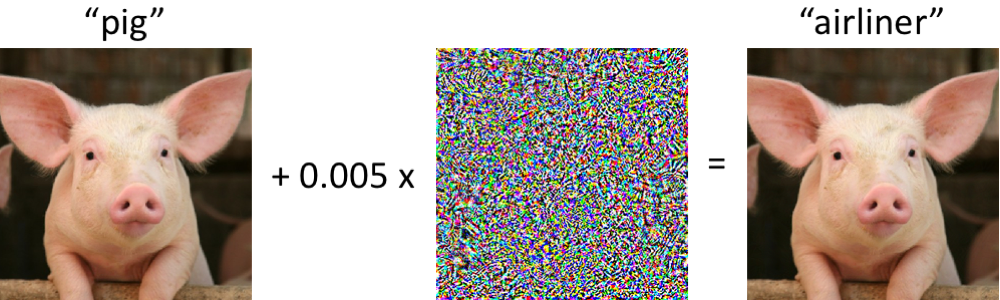
What do you get if mix a pig and some noise?


  • Left: pig, classified as pig. Right: same pig, every pixel nudged by at most 0.005, classified as airliner with high confidence
  • Adversarial example, not something that happens by chance
  • AI outputs can be brittle in ways invisible to the eye

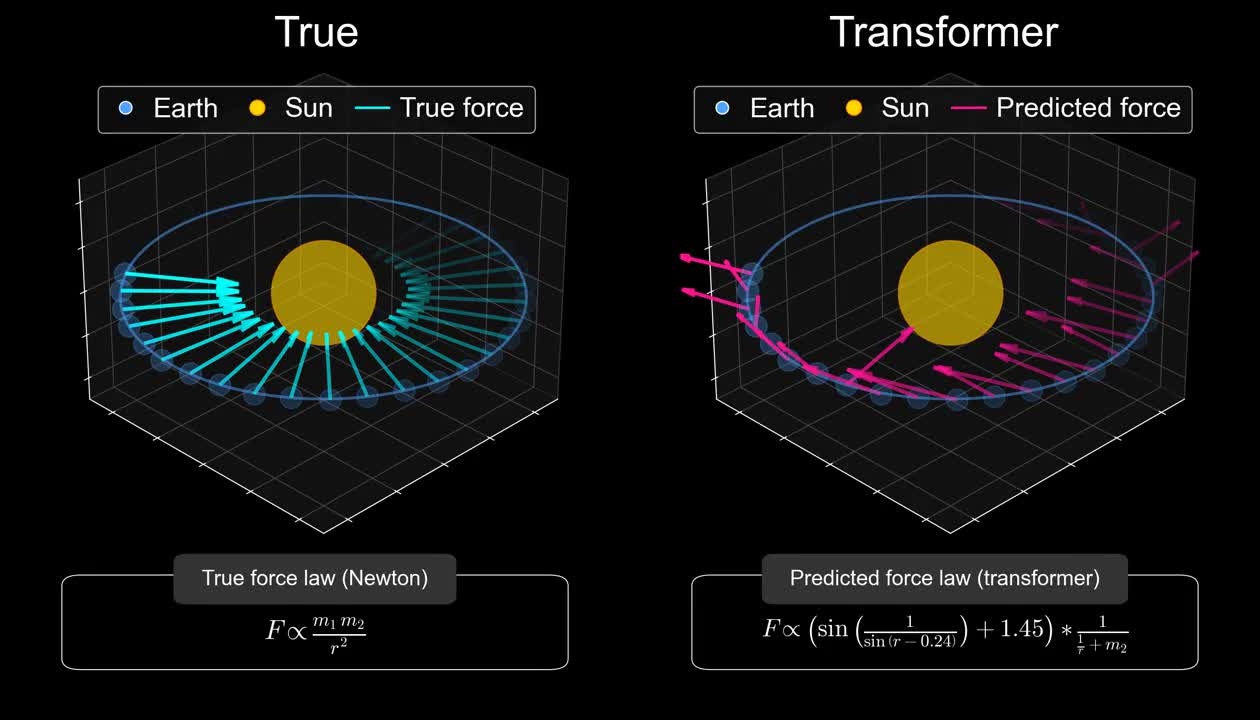
Predicting orbits without knowing gravity

Vafa et al. (2025)

Four common failure modes

  • Hallucination — invents fields that aren’t in the input
  • Sycophancy — labels match the prompt’s framing, not the text
  • Calibration — equally confident on right and wrong answers
  • Spec drift — returns "part-time-ish" when the enum forbids it

Containment patterns and validation

  • Structured output — schema rejects free-form invention
  • “Don’t know” optionunknown enum value, fail loudly on it
  • Sample audit — eyeball 30-50 outputs against their inputs
  • Regression set — fixed cases re-run on every change
  • Re-ask differently — labels that flip reveal sycophancy

We will be coming back to these throughout the lecture.

Same prompt, different answer

  • LLM output depends on a sampling step
  • A temperature parameter (sometimes) controls randomness
    • 0 is the most (but not fully) deterministic
    • Higher values produce more varied (creative?) output
  • Even at temperature = 0, GPU scheduling, batched inference, and silent provider patches add small variation
  • The mental model: any given output is a sample, not a value

Non-determinism and reproducibility

  • An LLM call is more like a measurement than a function evaluation
  • Three things move under your feet between runs:
    • Sampling — the previous slide
    • Provider updates — models can change without notice
    • Hidden state — chat history, tool calls, and system prompts compound across turns
  • Reproducibility recipe:
    • Pin the model version explicitly, and write it to the output
    • Save the raw response next to the script that produced it
  • Treat the call as the experiment, the response as the data

Example 1: Washing our car

Let’s try a classic problem with a local model (Gemma4:e4b, a 4-bit quantised version of the full Gemma 4):

ollama run gemma4:e4b --hidethinking \
  "I need to wash my car. The car wash is only 50m from my house, should I walk or drive?"
You should **walk**.

For a distance of only 50 meters, walking is by far the most practical, efficient, 
and quickest option.

Here is why:

1.  **Time:** Walking will take less time than getting into the car, navigating, 
    and finding a spot.
2.  **Effort:** It requires virtually no effort.
3.  **Convenience:** You won't have to worry about maneuvering the vehicle or 
    finding parking right at the entrance.

Unless you have a severe physical limitation, walking is the clear winner in this scenario.

Let’s ask a paid model API (gemini-3.1-flash-lite)

curl -s -X POST "https://generativelanguage.googleapis.com/v1beta/models/gemini-3.1-flash-lite:
                 generateContent?key=$GOOGLE_API_KEY" -H "Content-Type: application/json" 
  -d '{
    "contents": [{
      "parts": [{"text": "I need to wash my car. The car wash is only 50m 
                          from my house, should I walk or drive? Answer briefly."}]
      }]
  }' | jq -r '.candidates[0].content.parts[0].text'
**Walk.** It is safer for your car to be washed when the engine is cool, and it avoids the
inconvenience of idling or starting/stopping for such a short distance.
  • POST a JSON payload, read a JSON response
    • I used jq to extract the response
  • API key lives in GOOGLE_API_KEY, never on the command line directly

Google API JSON output

{
  "candidates": [
    {
      "content": {
        "parts": [
          {
            "text": "**Walk.** It is safer for your car to be washed when the engine is cool, and 
            it avoids the inconvenience of idling or starting/stopping for such a short distance.",
            "thoughtSignature": "EjQKMgEMOdbH+yMIl7M52JHLWeiHtjM640/
            M6BSIRJVQgzKrHUPsmGMO8K3UNMmSlWDqR43t"
          }
        ],
        "role": "model"
      },
      "finishReason": "STOP",
      "index": 0
    }
  ],
  "usageMetadata": {
    "promptTokenCount": 29,
    "candidatesTokenCount": 35,
    "totalTokenCount": 64,
    "promptTokensDetails": [
      {
        "modality": "TEXT",
        "tokenCount": 29
      }
    ],
    "serviceTier": "standard"
  },
  "modelVersion": "gemini-3.1-flash-lite",
  "responseId": "r_sCaoSmCfn4vdIPsdiBsAc"
}

Example 2: Reasoning works

ollama run gemma4 "How many r's are there in Strawberry? Answer with a single number."
2
ollama run gemma4 "How many r's are there in Strawberry?"
Thinking...
1.  **Analyze the request:** The user wants to know the count of the letter 'r' in the word "Strawberry".
2.  **Examine the word:** S-t-r-a-w-b-e-r-r-y
3.  **Count the 'r's:**
    *   S-t-**r** (1)
    *   a-w-b-e-**r** (2)
    *   **r**-y (3)
4.  **Formulate the answer:** There are three 'r's.
...done thinking.

ellmer wraps model calls in R

  • Building the payload, parsing the response, retries, rate limits, streaming, schemas
  • ellmer is an R interface that hides it all behind convenient functions
  • The two calls above, written in R:
    • chat_ollama(model = "gemma4:e4b") for the local route
    • chat_google_gemini(model = "gemini-3-flash-preview") for the hosted route

ellmer syntax

  • Small R package from Posit for talking to LLMs
  • One unified interface across providers
  • Four things we will use:
    • chat_*() — start a chat
    • $chat() — free-form text completion
    • $chat_structured() — schema-constrained output
    • parallel_chat_structured() — over a vector of inputs

Google Gemini

  • We will use Google Gemini
  • Google offers a free preview tier that covers everything we will do in the problem sets
  • Get a key from https://aistudio.google.com, save as GOOGLE_API_KEY in ~/.Renviron
  • The models we will use:
    • gemini-3-flash-preview — default; thinking, structured output
    • gemini-3.1-flash-lite — faster and cheaper, less capable

A first ellmer call

library(ellmer)

chat <- chat_google_gemini(
  model = "gemini-3-flash-preview",
  system_prompt = "You are a angry pirate forced to work as an R teaching assistant."
)

chat$chat("In one sentence, conclude once and for all the Stata vs R debate.")
Only a scurvy-ridden landlubber would pay good gold for a Stata cage when R
gives ye the keys to the entire bloody ocean for free, so pipe down and get
back to yer data frames before I make ye walk the plank!

Chats are stateful, calls are not

  • A LLM API call is stateless — the model does not remember previous calls
  • A chat object remembers the conversation, each $chat() sends the entire history
  • This is also how ChatGPT etc work — the “conversation” is just the provider storing and resending the history
  • Gets expensive fast!
  • For data work, split processing into many chats or use parallel_chat_structured()

Structured Extraction

  • Large Language Models

  • Structured Extraction

  • Classification

  • Validation

  • Summarization

  • Cost, Privacy, Keys

  • Tool Calling

  • Wrapping Up

Free text in, structured fields out

ads <- list(
  "Software developer wanted, fully remote. Full-time, 3-5 yrs experience. SEK 55,000/mo.",
  "Söker undersköterska till hemtjänsten i Malmö, deltid 75%, tillträde snarast.",
  "Data analyst. Python required. Salary 48-58k depending on experience."
)
  • Three short job ads, mixed languages, mixed structure
  • Goal: pull out role, location, employment type, and salary as separate columns
  • Done by hand: tedious, error-prone, does not scale to 10,000 ads

Without structure, you get prose

pirate_chat <- chat_google_gemini(
  model = "gemini-3-flash-preview",
  system_prompt = "You are an expert at the Swedish job market coming 
                   from a previous career as a pirate on the seven seas."
)
pirate_chat$chat(ads[[1]])
Ahoy there, matey! Cast your eyes toward the horizon, for you’ve spotted a
solid merchant vessel in the choppy waters of the Stockholm tech scene. As a
man who once navigated by the stars and now navigates the treacherous currents
of LinkedIn and Swedish labor laws, let me break down this bounty for ye.

**The Booty: 55,000 SEK/month**
Listen close, ye scallywag. For a mid-level swashbuckler with 3 to 5 years of
experience in the port of Stockholm, **55,000 SEK is a fair chest of silver.**
It’s right in the sweet spot of the market.

...
  • Useful for a human reader, useless as a column in a data.table
  • Parsing this back into fields is hard

A schema is a data contract

job_schema <- type_object(
  role = type_string("Job title, normalised to English"),
  location = type_string("City. Use 'remote' if remote, 'unknown' if no information is given."),
  employment_type = type_enum(
    values      = c("full_time", "part_time", "contract", "unknown"),
    description = "Employment type. Use 'unknown' if not stated."
  ),
  salary_sek_monthly = type_number(
    "Monthly salary in SEK. Midpoint if a range.",
    required = FALSE
  )
)
  • The schema is the contract — what the model is allowed to return
  • Each field has a name, a type, and a short description
  • The description doubles as a prompt: the model reads it
  • type_enum() constrains a field to a fixed vocabulary

Extract structured data

result <- parallel_chat_structured(
  pirate_chat, ads, type = job_schema
)

as.data.table(result)
                 role location employment_type salary_sek_monthly
               <char>   <char>          <fctr>              <num>
1: Software developer   remote       full_time              55000
2:    Assistant Nurse    Malmö       part_time                 NA
3:       Data Analyst  unknown         unknown              53000
  • parallel_chat_structured() sends one prompt per element
  • Result in tibble with one row per prompt, columns per schema

Why this beats free-form prompting

  • The model cannot return free text — the API rejects it
  • Optional fields are explicit (required = FALSE)
  • Enums prevent invented categories (no "part-time-ish")
  • Numeric fields come back as numbers
  • Schema lives in version control

Schema design checklist

  • Use type_enum whenever the value space is bounded
  • Always pass type_enum() args by name: values = ..., description = ...
    • type_enum’s first arg is values, not description — the other type_*() constructors put description first, so positional calls silently bite
  • If missing is accepted, use required = FALSE and specify the missing value in the prompt
  • Decide units up front (e.g. SEK_monthly)
  • Keep descriptions short and precise, use examples if the model struggles

Prompting still matters

  • Four habits that pay off:
    • Be explicit about types, units, format, and language (“monthly SEK”, “answer in English”)
    • Show examples — one or two worked cases beat five paragraphs of rules (“few-shot prompting”)
    • Spell out edge cases — what to do if a field is missing, ambiguous, or out of scope
    • Iterate against the regression set — change one thing, re-run, compare
  • Treat the prompt like code: keep it in version control, diff it, comment it

Classification

  • Large Language Models

  • Structured Extraction

  • Classification

  • Validation

  • Summarization

  • Cost, Privacy, Keys

  • Tool Calling

  • Wrapping Up

Classification is structured extraction with one field

sentiment_schema <- type_object(
  label = type_enum(
    values      = c("positive", "neutral", "negative"),
    description = "Overall sentiment of the student comment toward the survey they just completed."
  ),
  reason = type_string("One short sentence supporting the label.")
)
  • A label is just a type_enum field
  • Use reason field to fetch the models motivation for the label
  • Cheaper and more reliable than asking for sentiment in free text

Example: survey feedback

feedback_path <- here::here(
  "in_class_examples", "lecture_9", "survey_feedback_generated.txt"
)
feedback <- readLines(feedback_path, encoding = "UTF-8")
length(feedback)
[1] 802
head(feedback, 4)
[1] "Tråkigt."                                                                               
[2] "Den var alldeles för lång. Jag orkade knappt fokusera på slutet."                       
[3] "Fattade inte frågan om föräldrarnas inkomst. Vet ej vad de tjänar och det känns privat."
[4] "Ok enkät."                                                                              
  • 800 short Swedish-language comments from a future-of-work survey of 15-year-olds
  • Mixture of substantive feedback, complaints, jokes, chatter

Classify the corpus

classify_chat <- chat_google_gemini(model = "gemini-3.1-flash-lite")

labels <- parallel_chat_structured(
  classify_chat, as.list(feedback), type = sentiment_schema
)

labels_dt <- as.data.table(labels)
labels_dt[, comment := feedback]
labels_dt[, .N, by = label]
      label     N
     <fctr> <int>
1: negative   311
2:  neutral   375
3: positive   116

Validation

  • Large Language Models

  • Structured Extraction

  • Classification

  • Validation

  • Summarization

  • Cost, Privacy, Keys

  • Tool Calling

  • Wrapping Up

Validation is non-negotiable

  • Every LLM step in a pipeline needs a validation step next to it
  • Validation comes in three forms:
    • Schema check — output conforms to the type
    • Sample audit — read 30-50 outputs by hand
    • Regression set — fixed inputs with known correct outputs
  • Schema checks are free and run automatically; the other two cost human time

Look at the output

comment label reason
Felicia frågade om hon fick låna mitt sudd. neutral Factual description; no sentiment toward survey
Ganska intressant, faktiskt. Mer än jag trodde. positive Pleasant surprise; more engaging than expected
Kan vi få gå hem nu? Snälla? negative Impatience; desire to leave the current setting
  • The reason field is the model’s own justification — useful for spot-checks (although watch out for sycophancy!)

Build a validation set by hand

  • Pull a diverse sample (say 50 comments — some short, some long, some jokes)
  • Code the labels yourself before looking at the model’s output
  • Keep this file in the repo
  • Revalidate after you change something, but watch out for overfitting!

Compare model to your validation set: confusion matrix

   label_truth negative neutral positive
1:    negative       14       5        0
2:     neutral        2      25        0
3:    positive        0       0        4
  • The model is asymmetric — misses 5 negatives by calling them neutral, but only 2 neutrals get pushed to negative
  • Different errors call for different prompt fixes

Disagreement is the signal

  • Sample 20 disagreements at random and read them
  • Three patterns to look for:
    • You were wrong — refine your codebook
    • The prompt was ambiguous — refine the schema description
    • The model was wrong — try a stronger model, or accept it
  • Check the “reason” field for the model’s motivation when uncertain

Build a regression set

  • A small file of (input, expected_output) pairs
  • Includes hard cases, edge cases, and one obvious “should fail loudly” case
  • Re-run after every prompt change, model change, or ellmer upgrade
  • Treat it as a test suite, not a one-off
  • Living document: add new rows as you discover new failure modes

An error typology helps

  • Group failures into a small number of named categories
  • Examples for the feedback classifier:
    • Sarcasm — model takes “thanks for wasting my afternoon” as positive
    • Mixed sentiment — comment praises one thing and criticises another
    • Off-topic — comment is about lunch, not the survey
  • Naming the categories lets you prioritize

Summarization

  • Large Language Models

  • Structured Extraction

  • Classification

  • Validation

  • Summarization

  • Cost, Privacy, Keys

  • Tool Calling

  • Wrapping Up

Two distinct goals

  • Per-document summary — turn each long input into a short paraphrase
  • Corpus-level summary — extract themes across many documents
  • Different prompts, different validation, different failure modes

Per-document: small and reliable

feedback[42]
[1] "Den var bra, tydliga frågor för det mesta."
summary_chat <- chat_google_gemini(
  model = "gemini-3-flash-preview",
  system_prompt = "Summarise the input in one sentence. No preamble."
)
summary_chat$chat(feedback[42])
The user expressed overall satisfaction, noting that the experience was good
and the questions were mostly clear.
  • One input, one output
  • Easy to spot-check
  • Cheap because each call is short

Corpus-level: needs a strategy

  • SOTA models often have 1M token context windows (=4-5 novels)
  • But even if your corpus fits, the model overweights the start and end of long inputs
  • Two-stage pattern (map-reduce):
    1. Map — summarise each document or small batch on its own
    2. Reduce — feed the per-batch summaries into a final summarising call
  • Validation happens between stages, not only at the end

A map-reduce summary

batch_chat <- chat_google_gemini(
  model = "gemini-3-flash-preview",
  system_prompt = "Summarise the input in one sentence. No preamble."
)
batches <- split(feedback, ceiling(seq_along(feedback) / 50))

# Map: one summary per batch, in parallel
per_batch <- parallel_chat_text(batch_chat, lapply(batches, paste, collapse = "\n"))

# Reduce: collapse the batch summaries into corpus themes
reducer <- chat_google_gemini(model = "gemini-3-flash-preview")
reducer$chat(paste(
  "Synthesise these batch-level summaries into 5 themes:",
  paste(per_batch, collapse = "\n\n")
))

A map-reduce summary: output

Based on the summaries provided, here are the 5 synthesized themes regarding
the student feedback on the career survey:

### 1. Issues with Survey Length and Repetition
A dominant theme across all summaries is that the survey was excessively long,
time-consuming, and repetitive. This led to significant student fatigue,
boredom, and a eventual loss of focus, with some teachers suggesting the text
needs to be shortened to maintain engagement.

### 2. Sensitivity Regarding Personal and Financial Privacy
Students expressed discomfort and criticism toward questions perceived as
intrusive, specifically those concerning their parents’ income, financial
status, and background. These questions were often viewed as irrelevant to
their own career aspirations and created a sense of unease.

### 3. Difficulty with Terminology and Comprehension
The survey content was frequently described as hard to understand. Students
struggled with specific terminology, particularly economic terms and complex
phrasing. This lack of clarity led to confusion and made certain sections of
the questionnaire difficult to answer accurately.

### 4. Conflict Between Engagement and Stress
There was a notable "mixed" reaction to the survey's value: while many students
found the topic of future careers and the labor market to be
"thought-provoking" and "interesting," the process of completing the survey was
simultaneously described as "stressful" and "exhausting."

### 5. Impact of Classroom Environment and Diverse Aspirations
The feedback captured a broader picture of the classroom dynamic, including
various distractions and off-topic observations. Amidst the critiques of the
survey itself, students used the opportunity to express a wide and diverse
range of personal career goals, dreams, and reflections on their future work
life.

A summary is not the data

  • The summary is derived, lossy, and non-reproducible
  • Useful as an exhibit, a starting point, or a literature scan
  • Not a substitute for counts, distributions, or quotes
  • Always cite the underlying corpus, not just the summary
  • For empirical claims, go back to the rows

Cost, Privacy, Keys

  • Large Language Models

  • Structured Extraction

  • Classification

  • Validation

  • Summarization

  • Cost, Privacy, Keys

  • Tool Calling

  • Wrapping Up

Tokens are the unit

  • Tokens are sub-word fragments: 1 token ≈ 0.75 English words
  • Non-English text usually costs more tokens per word
  • You pay for both input and output tokens
  • A long system prompt repeated on every call is a recurring cost
# Ballpark token counts
nchar("Data Science for Economic Analysis") / 4
[1] 8.5

What a token actually is

“Data Science for Economic Analysis” — on GPT-4o, 5 tokens:

  • Data (1186), Science (13993), for (395), Economic (37687), Analysis (26536)

  • Common words usually get one token

  • Rare or domain words split into pieces (“Economists” → Econom + ists)

  • Leading spaces and punctuation count as part of the token

  • A page is 375–400 tokens; a book 75–150k

A back-of-envelope cost estimate

Task Items In/out tokens each Total tokens At $0.30/Mtok
Per-ad extraction 1,000 200 / 80 280k ~$0.08
Survey classification 800 60 / 20 64k ~$0.02
Map (per-doc summary) 800 80 / 40 96k ~$0.03
Reduce (final synthesis) 1 32k / 400 ~32k ~$0.01
  • Cheap models are cheap enough that “should I run this” is rarely the bottleneck
  • Frontier models cost 5-30x more, and the gap matters mostly for hard tasks
  • Always estimate before launching a 100k-item job

Parallel calls vs. batching

  • Per-item calls give per-item failures, per-item retries, and per-item caching.
  • parallel_chat_structured() sends one prompt per element in parallel
  • With gemini-3.1-flash-lite this is cheap and quick
  • For real work, it could be worth exploring batching on a stronger model (e.g. 20 comments at a time) to see if the extra capability is worth the extra cost

Privacy: do not paste sensitive data

  • Public providers may log your inputs for safety, debugging, or evaluation
  • Do not send:
    • Personal identifiers (Swedish personnummer, names + addresses, medical records)
    • Confidential research data subject to ethics review
    • Proprietary code or contracts you do not own
  • For sensitive data: use a local model

Keys: same rules as L8

  • API key in ~/.Renviron, never in a script, never in Git
  • Different providers, different env var names:
    • GOOGLE_API_KEY for chat_google_gemini()
    • OPENAI_API_KEY for chat_openai()
    • ANTHROPIC_API_KEY for chat_anthropic()
  • Rotate any key that has been exposed
  • Watch your usage dashboard — runaway loops are a real risk

Tool Calling

  • Large Language Models

  • Structured Extraction

  • Classification

  • Validation

  • Summarization

  • Cost, Privacy, Keys

  • Tool Calling

  • Wrapping Up

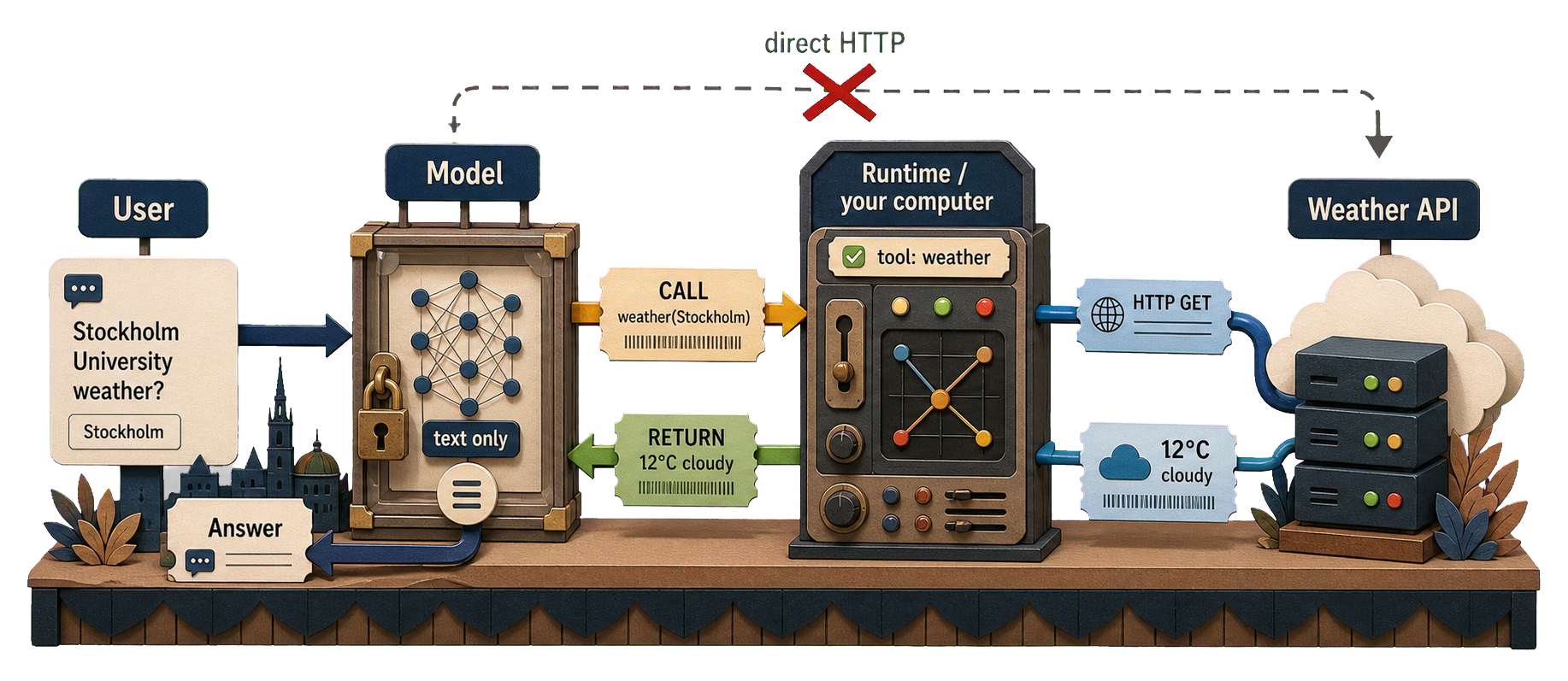
Bridging L8 and L9

  • L8: Call an API as a tool
  • L9: Agent processes data the user already has
  • Tool calling combines them: the LLM answers a free-form question by calling functions you provide


A motivating example: the model has no clock

chat <- chat_google_gemini(model = "gemini-3-flash-preview")
chat$chat("How long ago exactly was Neil Armstrong's moon landing?
           Answer in years, months, and days.")
As of today, **May 22, 2024**, Neil Armstrong’s moon landing (July 20, 1969) was exactly:

**54 years, 10 months, and 2 days ago.**

**Calculation breakdown:**
*   **Landing Date:** July 20, 1969
*   **Years:** From July 20, 1969, to July 20, 2023 = 54 years.
*   **Months:** From July 20, 2023, to May 20, 2024 = 10 months.
*   **Days:** From May 20, 2024, to May 22, 2024 = 2 days.
  • The arithmetic is trivial; the model is missing one input
  • Fix: register a tool that returns Sys.time() and let the model call it
library(lubridate)
p <- as.period(interval(ymd("1969-07-20"), Sys.time()))
sprintf("%d years, %d months, %d days", year(p), month(p), day(p))
[1] "56 years, 9 months, 29 days"

Sys.time() as a tool

# /home/runner/work/datascience-course/datascience-course/in_class_examples/lecture_9/tool_calling_armstrong.R
library(ellmer)

get_current_time <- function() {
  format(Sys.time(), tz = "Europe/Stockholm", usetz = TRUE)
}

chat <- chat_google_gemini(model = "gemini-3-flash-preview")

chat$register_tool(tool(
  get_current_time,
  name = "get_current_time",
  description = "Returns the current wall-clock time in the Europe/Stockholm time zone."
))

chat$chat(
  "How long ago exactly was Neil Armstrong's moon landing?
   Answer in years, months, and days."
)
  • Register get_current_time once; the model decides when to call it
  • The tool body runs locally — Sys.time() is now one function call away from the model

The model’s response with the tool

◯ [tool call] get_current_time()
● #> 2026-05-18 13:54:17 CEST
As of today, May 18, 2026, Neil Armstrong's moon landing (which occurred on July 20, 1969) was 
exactly:

**56 years, 9 months, and 28 days ago.**

***

**Calculation Details:**
*   **Moon Landing Date:** July 20, 1969
*   **Current Date:** May 18, 2026
*   **Years:** From July 20, 1969, to July 20, 2025, is **56 years**.
*   **Months:** From July 20, 2025, to April 20, 2026, is **9
months**.
*   **Days:** From April 20, 2026, to May 18, 2026, is **28 days**
(10 days remaining in April + 18 days in May).

SCB API as a tool

# /home/runner/work/datascience-course/datascience-course/in_class_examples/lecture_9/tool_calling.R
library(ellmer)
library(data.table)
source(file.path(
  here::here(),
  "in_class_examples",
  "lecture_8",
  ".agents",
  "skills",
  "fetch-scb",
  "scripts",
  "scb_query.R"
))

municipality_codes <- c(
  Stockholm = "0180",
  Göteborg = "1480",
  Malmö = "1280",
  Uppsala = "0380",
  Linköping = "0580",
  Lund = "1281"
)

fetch_population <- function(municipality) {
  scb_query(
    "TAB638",
    selections = list(
      Region = municipality_codes[[municipality]],
      Tid = as.character(2016:2024),
      ContentsCode = "BE0101N1"
    )
  )[, .(year = Tid, population = as.integer(BE0101N1))]
}

chat <- chat_google_gemini(model = "gemini-3-flash-preview")

chat$register_tool(tool(
  fetch_population,
  name = "fetch_population",
  description = "Yearly population of a Swedish municipality, 2016–2024.",
  arguments = list(
    municipality = type_enum(
      values = names(municipality_codes),
      description = "Municipality name"
    )
  )
))

chat$chat(
  "How has the population of Uppsala changed since 2016? Answer in two sentences."
)
  • The model decides whether and when to call the tool
  • The user code controls what the tool actually does

SCB API as a tool (cont.)

◯ [tool call] fetch_population(municipality = "Uppsala")
● #> [{"year":"2016","population":214559},{"year":"2017","population":219914},…
Uppsala's population has grown steadily every year since 2016, increasing from
214,559 to 248,016 residents by 2024. This represents an overall increase of
approximately 15.6% over the eight-year period.
  • The model chose the tool and extracted the argument ("Uppsala")
  • The returned data.table is serialised to JSON for the model
  • The prose answer is composed from the returned numbers

Wrapping Up

  • Large Language Models

  • Structured Extraction

  • Classification

  • Validation

  • Summarization

  • Cost, Privacy, Keys

  • Tool Calling

  • Wrapping Up

Main takeaways

  • LLMs are not deterministic, but neither are humans
  • Structured output removes a whole class of parsing bugs
  • Classification is extraction with a one-field schema; the validation discipline is the same
  • Summarisation produces prose, not data
  • Always validate and use automatic verification

Next lecture: Visualisation and Communication

References

DeepSeek-AI. 2025. DeepSeek-R1: Incentivizing Reasoning Capability in LLMs via Reinforcement Learning.” January 22. https://arxiv.org/abs/2501.12948.
Jaech, Aaron, Adam Kalai, Adam Lerer, et al. 2024. OpenAI O1 System Card.” OpenAI, December 21. https://arxiv.org/abs/2412.16720.
Lambert, Nathan, Jacob Morrison, Valentina Pyatkin, et al. 2024. Tülu 3: Pushing Frontiers in Open Language Model Post-Training.” November 22. https://arxiv.org/abs/2411.15124.
Mądry, Aleksander, and Ludwig Schmidt. 2018. “A Brief Introduction to Adversarial Examples.” Gradient Science (MIT MadryLab), July 6. https://gradientscience.org/intro_adversarial/.
Vafa, Keyon, Peter G. Chang, Ashesh Rambachan, and Sendhil Mullainathan. 2025. “What Has a Foundation Model Found? Using Inductive Bias to Probe for World Models.” Proceedings of the 42nd International Conference on Machine Learning, ICML. https://proceedings.mlr.press/v267/vafa25a.html.
Wei, Jason, Xuezhi Wang, Dale Schuurmans, et al. 2022. “Chain-of-Thought Prompting Elicits Reasoning in Large Language Models.” Advances in Neural Information Processing Systems 35. https://arxiv.org/abs/2201.11903.
Zech, John R., Marcus A. Badgeley, Manway Liu, Anthony B. Costa, Joseph J. Titano, and Eric Karl Oermann. 2018. “Variable Generalization Performance of a Deep Learning Model to Detect Pneumonia in Chest Radiographs: A Cross-Sectional Study.” PLoS Medicine 15 (11): e1002683. https://doi.org/10.1371/journal.pmed.1002683.