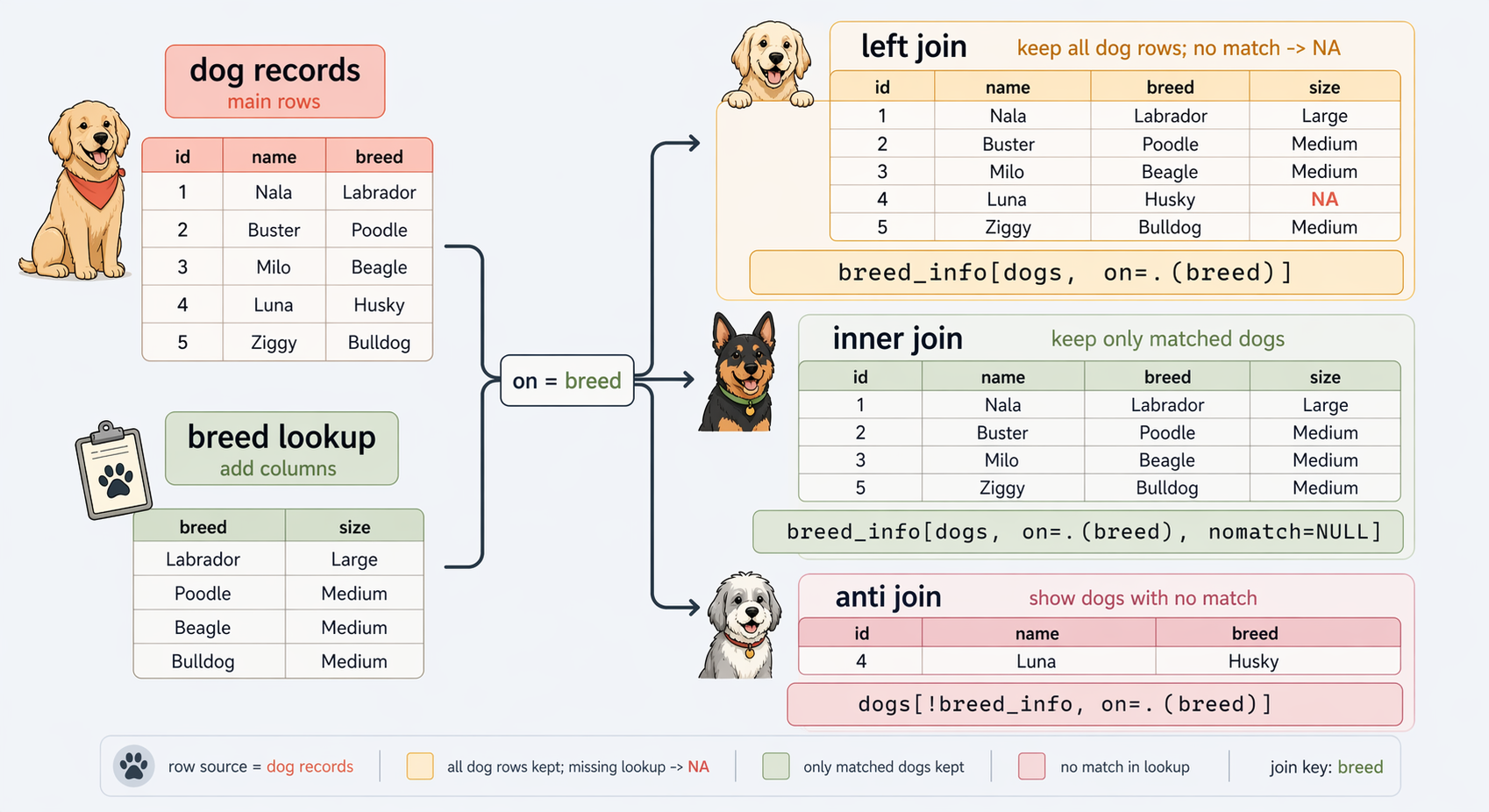
Primary key vs foreign key
- A (primary) key: uniquely identifies rows
- A foreign key: another table’s primary key
breed_info$breedshould be uniquedogs$breedis allowed to repeat

The Institute for Evaluation of Labour Market and Education Policy (IFAU)
2026-05-05
DT[i, j] to subset and computeby= to summarize and transform by groupJoining
Reshaping
Manipulating Strings
Manipulating Dates and Timestamps
Iteration
Extra: More on strings and dates
Extra: DT non-equi joins and rolling joins
Inner Join: Keep only rows with matching keys in both tables
Left (outer) join: Keep left table, add matches from the right
Full outer join: Keep all rows from both tables
Anti join: Keep rows from left table that have no match in the right
breed_info$breed should be uniquedogs$breed is allowed to repeatNAdata.table has two alternatives:
merge(x, y, by = "key")Y[X, on = "key"] more efficient, allows calculations during join
breed_info[dogs, on = .(breed)] is like the SQL command:dogs LEFT JOIN breed_info ON breed dog_id name breed avg_life_exp origin
<char> <char> <char> <num> <char>
1: 0013 Buddy Labrador Retriever 11.0 Canada
2: 3382 Lucy German Shepherd 11.0 Germany
3: 4200 Max Golden Retriever 11.0 Scotland
---
168: 8857 Snowy Corgi NA <NA>
169: 0126 Leo King Whippet 13.5 United Kingdom
170: 8159 Tut Whippet 13.5 United Kingdom dog_id name breed avg_life_exp origin
<char> <char> <char> <num> <char>
1: 0013 Buddy Labrador Retriever 11.0 Canada
2: 3382 Lucy German Shepherd 11.0 Germany
3: 4200 Max Golden Retriever 11.0 Scotland
---
145: 8430 Mop Whippet 13.5 United Kingdom
146: 0126 Leo King Whippet 13.5 United Kingdom
147: 8159 Tut Whippet 13.5 United KingdomKeys should not have duplicates:
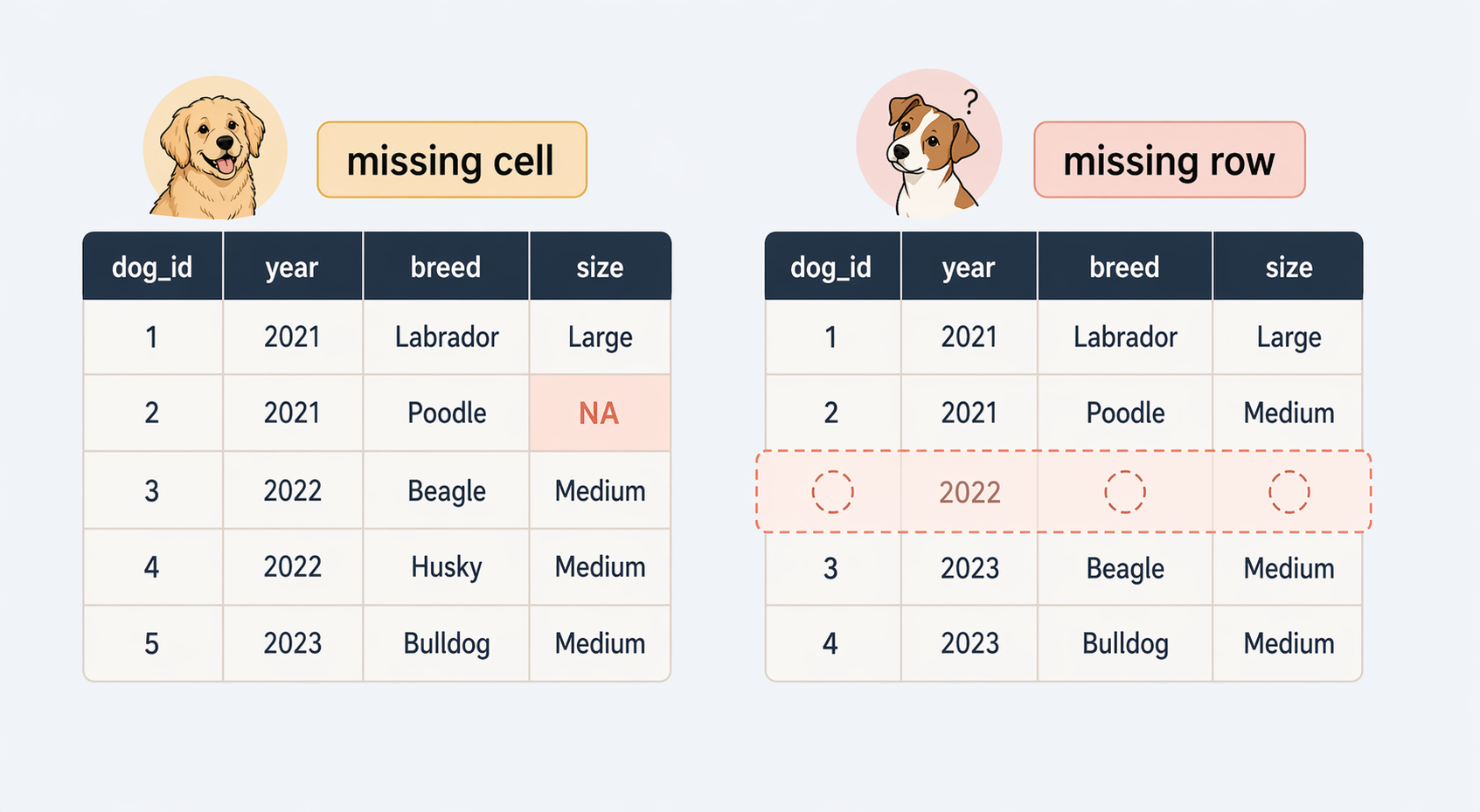
Or missing values:
dogs has one row per dogsales has many rows per breed over time breed sales_n mean_sale_price last_sale
<char> <int> <num> <IDat>
1: Poodle (Standard) 143 658.3 2024-12-12
2: Labrador Retriever 94 551.6 2024-11-28
3: Pug 115 653.2 2024-12-23
---
8: Dachshund 89 360.8 2024-12-22
9: Beagle 91 362.8 2024-12-14
10: Golden Retriever 87 561.1 2024-12-20[1] 170 [1] "Bulldog" "Boxer" "Bull Terrier"
[4] "Dalmatian" "Whippet" "Irish Setter"
[7] "Jack Russel Terrier" "Boston Terrier" "Corgi"
[10] "Irish Wolfhound" "Chesapeake Bay Retriever" "Afghan Hound" dog_id event_time shelter_name staff_id event_type event_date
<char> <POSc> <char> <char> <char> <IDat>
1: 0013 2023-01-15 08:42:00 Happy Paws Shelter A12 intake 2023-01-15
2: 0013 2023-03-20 23:40:00 Happy Paws Shelter B07 adopted 2023-03-20
3: 3382 2023-02-10 09:05:00 City Animal Care A12 intake 2023-02-10
4: 3382 2023-02-13 14:30:00 City Animal Care V01 vet_check 2023-02-13
5: 3382 2023-04-01 11:30:00 City Animal Care C03 adopted 2023-04-01
6: 4200 2023-03-05 10:15:00 Willow Creek Adoptions A08 intake 2023-03-05i. lets data.table compute during the join dog_id breed age avg_years_left
<char> <char> <int> <num>
1: 0013 Labrador Retriever 5 6.0
2: 3382 German Shepherd 3 8.0
3: 4200 Golden Retriever 7 4.0
4: 6152 Bulldog 4 5.0
5: 8186 Beagle 6 6.5 dog_id event_time event_type
<char> <POSc> <char>
1: 0013 2023-01-15 08:42:00 intake
2: 0013 2023-03-20 23:40:00 adopted
3: 3382 2023-02-10 09:05:00 intake
4: 3382 2023-02-13 14:30:00 vet_check
5: 3382 2023-04-01 11:30:00 adoptedKey: <dog_id, event_type>
dog_id event_type
<char> <char>
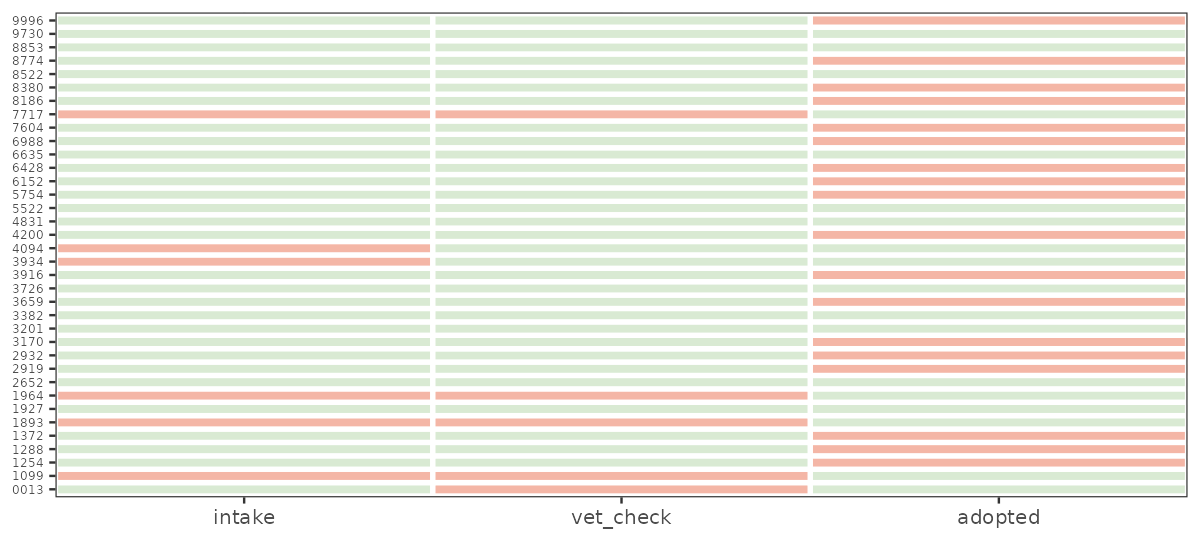
1: 0013 vet_checkCJ() cross-joins the levels you expected to seecombination_grid <- events[skeleton, on = .(dog_id, event_type)]
combination_grid[, present := !is.na(event_time)]
combination_grid[, event_type := factor(event_type, levels = c("intake", "vet_check", "adopted"))]
missing_combo_plot <- ggplot(
combination_grid,
aes(x = event_type, y = dog_id, fill = present)
) +
geom_tile(color = "white", linewidth = 1.2) +
scale_fill_manual(values = c("TRUE" = "#d9ead3", "FALSE" = "#f4b6a6")) +
scale_x_discrete(expand = c(0, 0)) +
labs(x = NULL, y = NULL) +
theme(legend.position = "none",
axis.text.y = element_text(size = 6))Joining
Reshaping
Manipulating Strings
Manipulating Dates and Timestamps
Iteration
Extra: More on strings and dates
Extra: DT non-equi joins and rolling joins
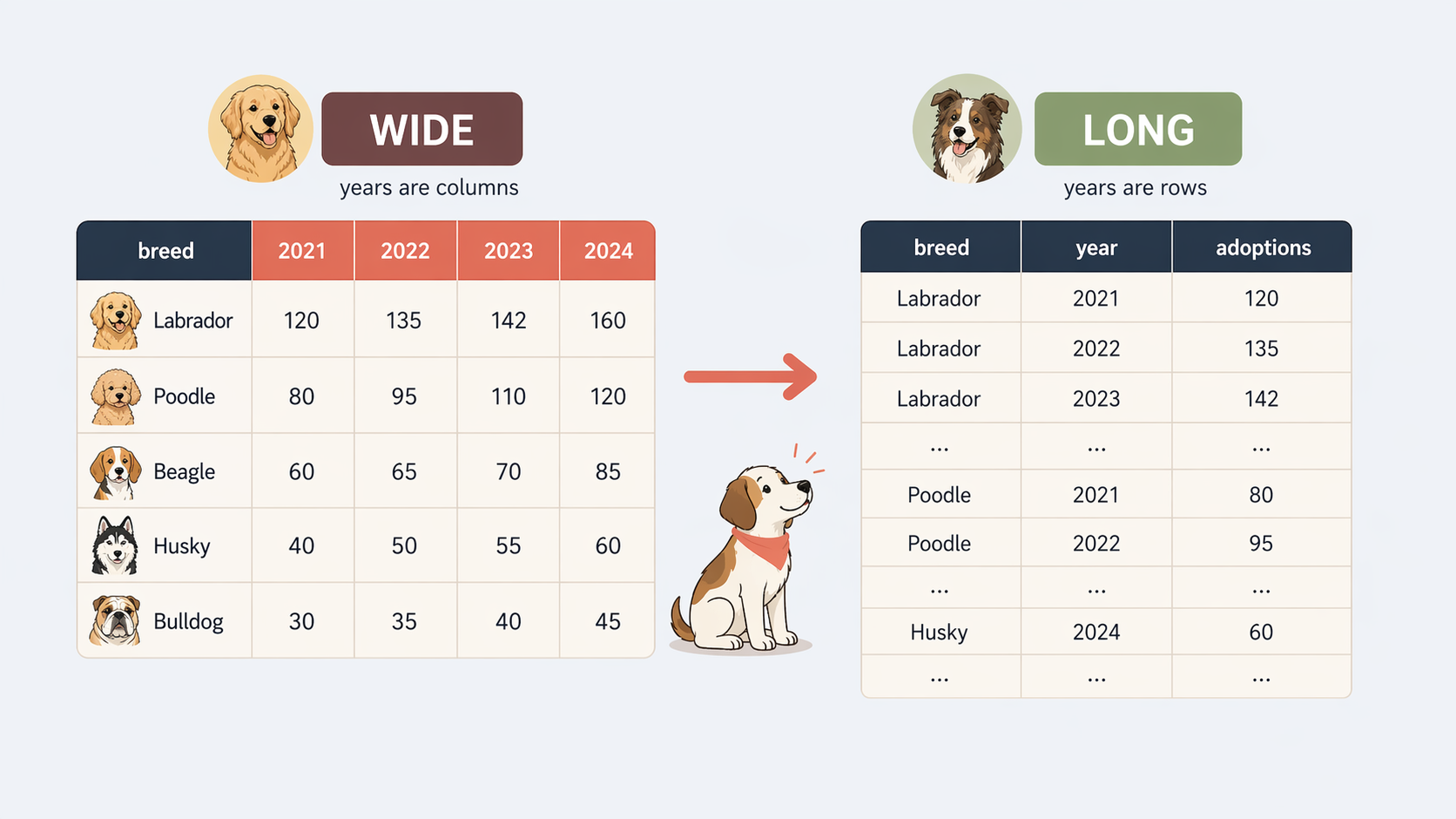
ggplot (one column per aesthetic: x, y, colour)Base R has reshape() but it is clunky. data.table has two more intuitive (and much faster) functions:
dcast() for long → widemelt() for wide → longdcast(): long → widedcast(): long → wideKey: <event_date>
event_date adopted intake vet_check
<IDat> <int> <int> <int>
1: 2023-01-15 0 1 0
2: 2023-02-10 0 1 0~ stays as rows~ becomes new column namesvalue.var says which column’s values fill the cellsdcast aggregatesKey: <breed>
breed adopted intake vet_check
<char> <int> <int> <int>
1: Beagle 1 2 2
2: Border Collie 1 1 1
3: Boxer 3 4 4breed × event_type combinationdcast must aggregatelength with a warning; better to say what you mean
fun.aggregate explicitly: length, sum, mean, min, maxmelt(): wide → long event_date event_type N
<IDat> <fctr> <int>
1: 2023-01-15 adopted 0
2: 2023-02-10 adopted 0
3: 2023-02-13 adopted 0
---
205: 2024-03-30 vet_check 1
206: 2024-04-05 vet_check 0
207: 2024-04-08 vet_check 1id.vars are the columns that identify a row event_type total
<fctr> <int>
1: adopted 18
2: intake 30
3: vet_check 35event_type directly
ggplot() wants the same shape: one column per aestheticmelt() first often simplifies summary and plottingJoining
Reshaping
Manipulating Strings
Manipulating Dates and Timestamps
Iteration
Extra: More on strings and dates
Extra: DT non-equi joins and rolling joins
"Corgi", " corgi", "CORGI ""Russel" vs "Russell""Corgi" vs "Pembroke Welsh Corgi""03/20-2023" name new owner
<char> <char>
1: Daisy Ren\xe9e Dubois
2: Charlie Kenji Tanaka
3: L\xfana Sof\xeda M\xfcllerfread(..., encoding = "Latin-1")[1] "Jack Russel Terrier" "Corgi" tolower() / toupper() standardise case
paste(a, b, sep = " ") and paste0(a, b) glue vectors elementwise
[1] "Buddy the Labrador Retriever" "Lucy the German Shepherd"
[3] "Max the Golden Retriever"
sprintf("%s ... %d", ...) for templated output: - %s strings, %d integers, %f doubles
[1] "Buddy (5 years old)" "Lucy (3 years old)" "Max (7 years old)" When equality is not enough:
"03/20-2023" on either / or -A regular expression (regex) describes a pattern of text:
grepl(), sub(), gsub(), tstrsplit(), …grep, sed"Corgi" matches "Corgi"^, $, ., *, +, [...], |^[A-Z][a-z]+ Russel+$ reads left-to-right as:
^ — start of string[A-Z] — one uppercase letter[a-z]+ — one or more lowercase lettersRusse — a space, then literal textl+ — one or more ls (matches “Russel” and “Russell”)$ — end of string| Symbol | Meaning |
|---|---|
[abc] |
one of a, b, c |
[a-z] |
any lowercase letter |
. |
any single character |
* / + / ? |
zero+, one+, or zero-or-one of the previous |
\\s / \\d |
whitespace / digit |
^ / $ |
start / end of string |
| |
OR — either pattern |
grepl[1] "Corgi"[1] "Jack Russel Terrier" "Corgi" [1] "Corgi"grepl(pattern, x) returns TRUE/FALSE per elementgrepv() returns the matching values^ matches the start of the string
$ matches the end of the string
sub and gsubcharacter(0)sub(pat, repl, x) — replace first match per elementgsub(pat, repl, x) — replace all matches per element[1] "Border Collie" "Labrador Retriever"\\s for a whitespace character+ for one or more of the preceding characterJoining
Reshaping
Manipulating Strings
Manipulating Dates and Timestamps
Iteration
Extra: More on strings and dates
Extra: DT non-equi joins and rolling joins
Date stores a calendar day with no time of dayPOSIXct stores an instant in time, accurate to secondsDate vs data.table::IDateIDate is data.table’s calendar-date type — integer-backed, ~half the memory of base R DateIDate inherits from Date, so the two are interchangeable in almost all operationsDate / IDate: day only — no time of day, no timezoneas.IDate(x, format = ...) for calendar datesas.POSIXct(x, format = ..., tz = ...) for timestampsfread() parses common formats automatically — flag suspect columns and re-parsestrptime format codes| Code | Meaning |
|---|---|
%Y |
year, 4-digit |
%y |
year, 2-digit |
%m |
month number |
%B |
month name |
%b |
month abbreviated |
%d |
day of month |
| Code | Meaning |
|---|---|
%H |
hour (24h) |
%M |
minute |
%S |
second |
%F |
%Y-%m-%d shortcut |
%T |
%H:%M:%S shortcut |
chr [1:170] "03/20-2023" "04/01-2023" "06/15-2023" "07/11-2023" "08/02-2023" ... dog_id intake_date sale_date
<char> <IDat> <IDat>
1: 0013 2023-01-15 2023-03-20
2: 3382 2023-02-10 2023-04-01
3: 4200 2023-03-05 2023-06-15
4: 6152 2023-04-20 2023-07-11
5: 8186 2023-05-11 2023-08-02lubridateymd, mdy, dmyymd_hms("2024-03-20 23:40:00") for timestampstz = argument; otherwise UTCfread() recognises timestamps automatically dog_id event_type event_time
<char> <char> <POSc>
1: 0013 adopted 2023-03-20 23:40:00Warning! Assumes the timezone is UTC
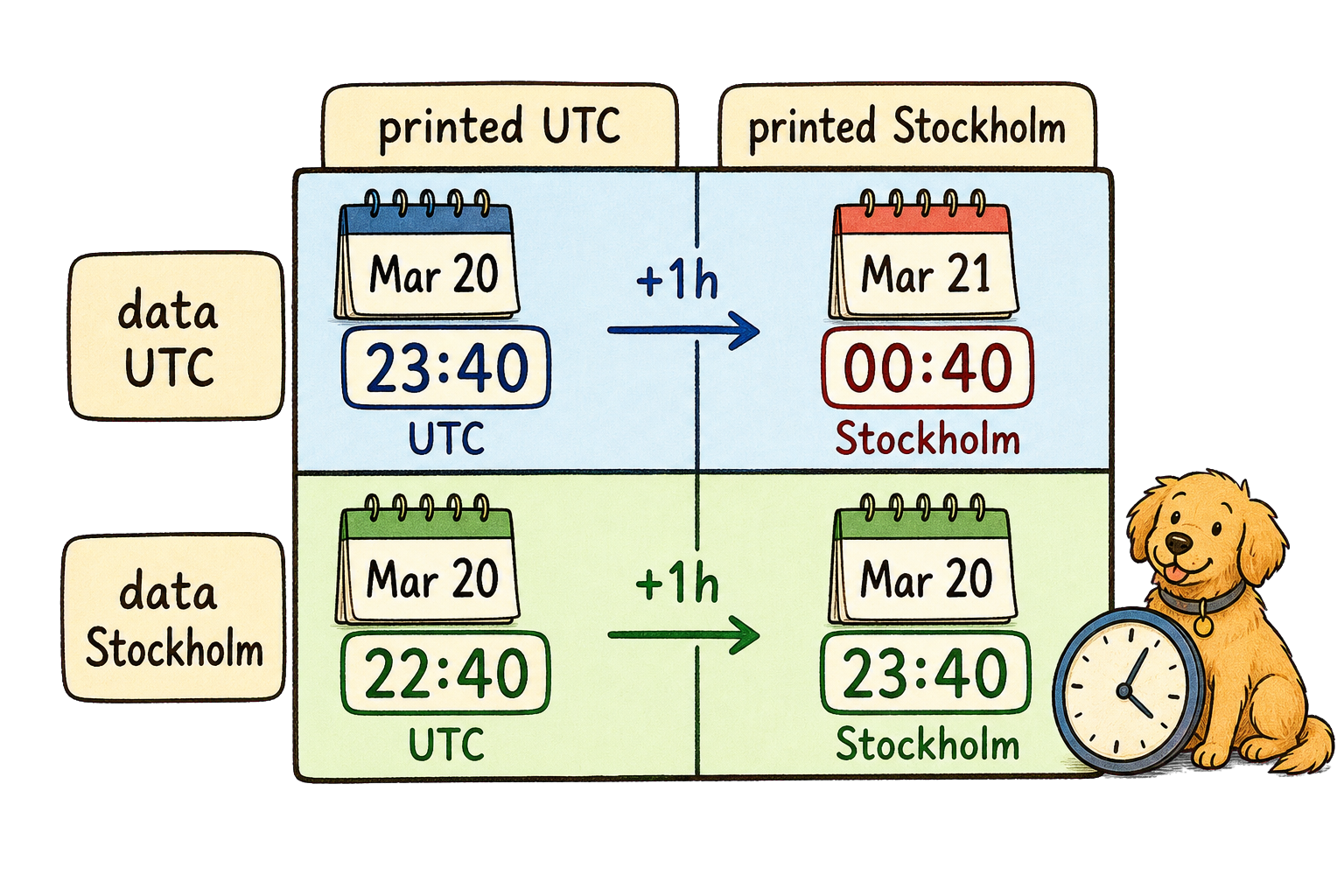
All outputs change time/dates instead of timezone.
ts_fix <- fread(
  file.path(dog_path, "dog_events.csv"),
  colClasses = list(character = c("dog_id", "event_time"))
)[dog_id == "0013" & event_type == "adopted", .(dog_id, event_type, event_time)]
ts_fix[,
  event_time := as.POSIXct(
    event_time,
    format = "%Y-%m-%d %H:%M:%S",
    tz = "Europe/Stockholm"
  )
]
ts_fix
dog_id event_type event_time
<char> <char> <POSc>
1: 0013 adopted 2023-03-20 23:40:00lubridate packagewith_tz(t, "Europe/Stockholm") keeps instant, changes display
force_tz(t, "Europe/Stockholm") keeps time, changes instant
   average_stay_days longest_stay
          <difftime>   <difftime>
1: 87.19403 days 116 dayslubridate) sale_date year month day weekday
<IDat> <num> <num> <int> <num>
1: 2023-03-20 2023 3 20 2
2: 2023-04-01 2023 4 1 7
3: 2023-06-15 2023 6 15 5
4: 2023-07-11 2023 7 11 3
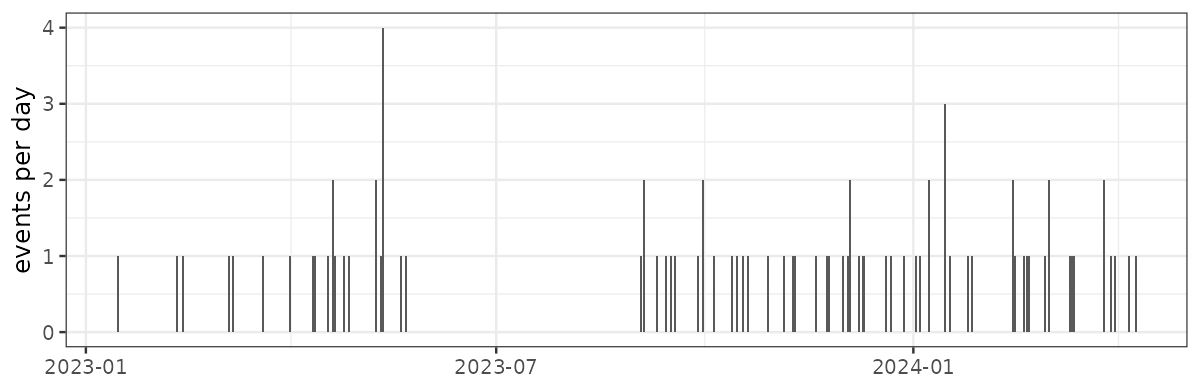
5: 2023-08-02 2023 8 2 4lubridate)floor_date in by= for monthly aggregationdifftimeA count over time graph can reveal missing data that a tabular check would miss.
Joining
Reshaping
Manipulating Strings
Manipulating Dates and Timestamps
Iteration
Extra: More on strings and dates
Extra: DT non-equi joins and rolling joins
by before you iterate with loopsby=.SDlapply() and relativeslapply(x, f) calls f on each element of x — returns a list, one result per inputlength(input) == length(output)sapply(x, f) — simplify to a vector or matrix when possiblevapply(x, f, FUN.VALUE) — like sapply with a type contractmapply(f, x, y) — parallel iteration over several vectorsapply(M, MARGIN, f) — over rows or columns of a matrix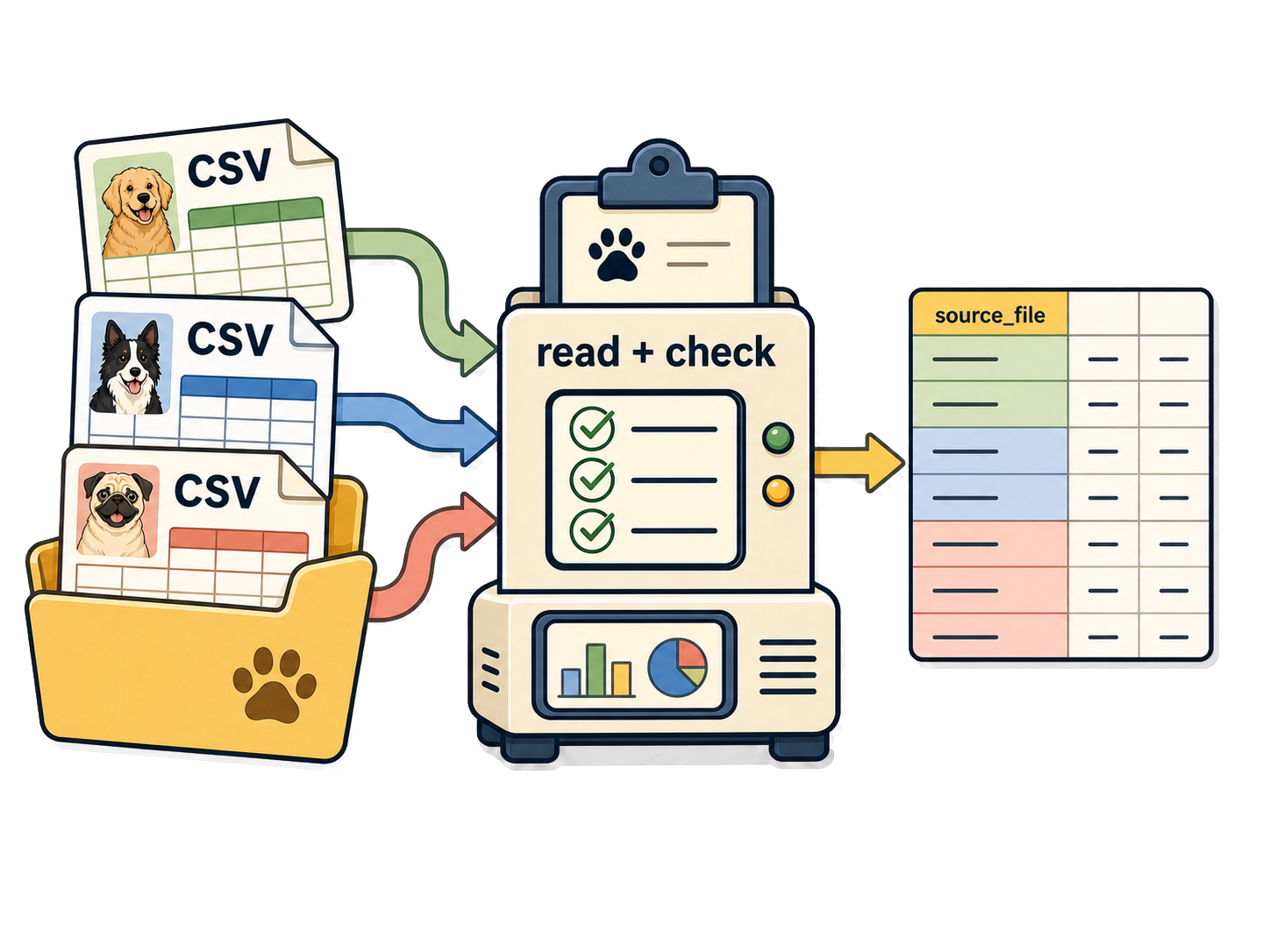
read_dog_events <- function(path) {
  if (!file.exists(path)) {
    warning("File not found, skipping: ", path)
    return(NULL)
  }
  dt <- fread(path, colClasses = list(character = c("dog_id", "event_time")))
  dt[,
    event_time := as.POSIXct(
      event_time,
      format = "%Y-%m-%d %H:%M:%S",
      tz = "Europe/Stockholm"
    )
  ]
  dt[, event_date := as.IDate(event_time, tz = "Europe/Stockholm")]
  dt
}warning() flags a problem without aborting the batchNULL lets rbindlist() skip the file silentlylapply() + rbindlist(idcol = ...) source_file rows dogs
<char> <int> <int>
1: city_animal_care_events.csv 31 12
2: happy_paws_shelter_events.csv 27 13
3: willow_creek_adoptions_events.csv 25 11lapply() returns one list element per filerbindlist(idcol = ...) keep provenancerbindlist silently drops NULL entries
After every join, reshape, or type change:
lapply()Joining
Reshaping
Manipulating Strings
Manipulating Dates and Timestamps
Iteration
Extra: More on strings and dates
Extra: DT non-equi joins and rolling joins
tstrsplit sale_date sale_month sale_day sale_year
<IDat> <char> <char> <char>
1: 2023-03-20 2023 03 20
2: 2023-04-01 2023 04 01
3: 2023-06-15 2023 06 15
4: 2023-07-11 2023 07 11
5: 2023-08-02 2023 08 02[/-] matches either / or - — handles inconsistent delimiters in one passstringr offers a more consistent grammarstr_ and take the string firststr_detect(x, pattern) for greplstr_replace_all(x, pattern, replacement) for gsubstr_to_lower(x), str_squish(x), str_split_fixed(x, sep, n)ISO weeks have their own year. Dec 30, 2024 is ISO week 1 of 2025; pair isoyear() with isoweek(), never year()
Joining
Reshaping
Manipulating Strings
Manipulating Dates and Timestamps
Iteration
Extra: More on strings and dates
Extra: DT non-equi joins and rolling joins
                 breed  sale_date price_usd
                <char>     <IDat>     <int>
 1:          Chihuahua 2023-06-08       341
 2:     French Bulldog 2023-06-08       867
 3: Labrador Retriever 2023-06-03       592
---
19:      Border Collie 2023-06-01       486
20:     French Bulldog 2023-06-13      1233
21:             Beagle 2023-06-09       402
on = accepts <, <=, >, >= instead of ==date falls inside the window date price_usd
<IDat> <int>
1: 2023-01-15 618
2: 2023-06-15 592
3: 2023-12-08 587roll = TRUE carries the last prior value forward; roll = "nearest" picks closest in either directionNow combine both ideas. Let’s calculate the average price during two months around each sale:
dogs[
  sales[
    dogs[
      !is.na(sale_date),
      .(
        dog_id,
        breed,
        date1 = as.Date(sale_date) %m-% months(2),
        date2 = as.Date(sale_date) %m+% months(2)
      )
    ],
    on = c("breed", "date >= date1", "date < date2"),
    by = .EACHI,
    .(dog_id, mean_price = mean(price_usd, na.rm = TRUE))
  ],
  on = "dog_id",
  avg_price_2months := i.mean_price
]Let’s verify it worked
           breed  sale_date avg_price_2months
          <char>     <IDat>             <num>
1: Border Collie 2024-01-12          420.0909