Catching Bugs and Coding Assistance

The Institute for Evaluation of Labour Market and Education Policy (IFAU)
2026-04-23
Today
- Why code breaks and what to do about it
- How to fail early
- Getting coding assistance from your IDE and agents
Why this lecture now
- The hard part is no longer just writing code
- The hard part is keeping track of objects, files, assumptions
- This is where people start wasting hours
- Good workflow habits are cheap
Positron
- We will be using Positron today, because of its built-in debugger.
- Positron is a VS Code fork, so it will look familiar.
- If you prefer to stay with VS Code you can use the R Debugger extension but it can be a bit finicky to get going.
Errors everywhere
Errors everywhere
Debugging
Pre-empt the bugs: fail usefully
IDE code assistance
Agentic development
Errors everywhere
Programming is a process of constant errors.
Getting unstuck
Error in if (x) { : missing value where TRUE/FALSE neededError: object 'panel_2023' not foundError in library(httr2) : there is no package called 'httr2'Error in [ : subscript out of boundsYour job: debug the code and find the bad assumption.
Running code is not necessarily working code
- Errors stop the script (good!)
- But bad assumptions do not always cause errors
- A silent bug is much worse
- In data work, incorrect output can still look great
Debugging is a loop
- Reproduce the problem
- Isolate the first bad step
- Inspect what exists now
- Compare expected versus actual
- Change one thing
- Retry
Make it repeatable and small
- Get to one command or one script that fails every time
- Strip away code that is not part of the problem
- Keep the failing example fast to rerun
- Pay attention to inputs that fail and inputs that do not
- Small, repeatable bugs are much easier to debug and share
What to inspect first
- What file or object is this line using?
- What class does the object have?
- What values do I actually have?
- Which line first creates something surprising?
- What changed since the last time this worked?
Useful inspection commands
str() is probably the most useful inspection command in R.
Remember to start a clean session
- Restart R to clean the slate
- Rerun the script from the top
- If it works in a clean session, it is more likely to be truly fixed
Don’t use .RData
R offers to save your workspace on exit and reload it on startup
- Objects from last week’s session silently reappear
- This is the top cause of “huh, this worked before?”
Turn it off.
Example 1: Selecting a data frame column
Let’s inspect:
- Selecting a single column returns a vector
- An issue if you expected a data frame
Example 1: Selecting a data frame column (cont.)
drop = FALSE forces R to keep the data frame structure:
Asking for help
Sometimes you cannot figure out or resolve the error on your own.
I was planning on talking about Stack Overflow here, but…
Asking for help (from robots)
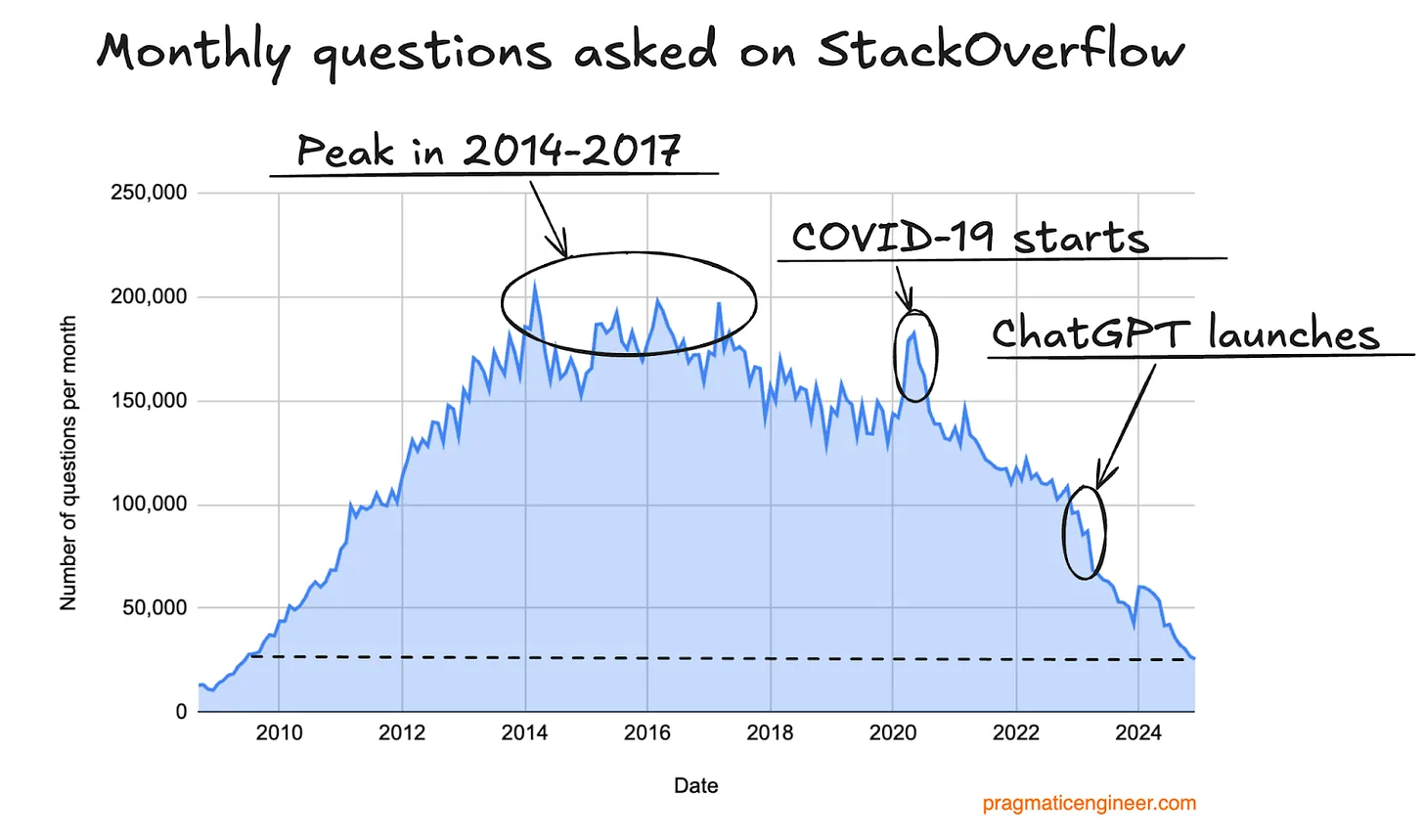
Just ask an LLM instead - I’ll teach you how in a few slides!
https://blog.pragmaticengineer.com/stack-overflow-is-almost-dead/
Debugging
Errors everywhere
Debugging
Pre-empt the bugs: fail usefully
IDE code assistance
Agentic development
Debugging tools
- Simple issues can be debugged by printing and inspecting
- For more complex problems, R provides powerful debugging tools:
traceback()to see the call stack after an errorbrowser()to step through code interactivelydebug(FUN)to runbrowser()onFUN()calls
Example 2: A simple traceback()
# in_class_examples/lecture_5/01_traceback_test.R
prepare_series <- function(x) growth_rates(trimws(x))
growth_rates <- function(x) log_change(x)
log_change <- function(x) diff(log(x))
average_growth <- function(x) mean(prepare_series(x))

average_growth(c("100", "120", "oops", "150"))


f <- function(x) {
  apply(x, 1, mean)
}
Error in log(x) : non-numeric argument to mathematical functionReading a traceback
traceback()prints the call stack- One row per function call, starting with the most recent
The error message tells you what went wrong; the traceback helps you locate where the error occurred.
Example 2: A simple traceback() (cont.)
Calls: source ... prepare_series -> growth_rates -> log_change -> diff
11: (function ()
    traceback(2))()
10: diff(log(x))
9: log_change(x)
8: growth_rates(trimws(x))
7: prepare_series(x)
6: mean(prepare_series(x))
5: average_growth(c("100", "120", "oops", "150"))
4: eval(ei, envir)
3: eval(ei, envir)
2: withVisible(eval(ei, envir))
1: source("/home/runner/work/datascience-course/datascience-course/in_class_examples/lecture_5/01_traceback_test.R",
       chdir = TRUE)
Example 3: A more realistic traceback()
# in_class_examples/lecture_5/02_traceback_realistic.R
get_municipality_history <- function(panel, municipality_code) {
  panel[panel$municipality_code == municipality_code, , drop = FALSE]
}

get_latest_rate <- function(municipality_panel) {
  latest_year <- max(municipality_panel$year)

  municipality_panel[
    municipality_panel$year == latest_year,
    "unemployment_rate"
  ][[1]]
}

get_reference_rate <- function(municipality_panel, reference_year) {
  reference_rate <- municipality_panel[
    municipality_panel$year == reference_year,
    "unemployment_rate"
  ]

  reference_rate[[1]]
}

compute_change_from_reference <- function(municipality_panel, reference_year) {
  latest_rate <- get_latest_rate(municipality_panel)
  reference_rate <- get_reference_rate(municipality_panel, reference_year)

  latest_rate - reference_rate
}

build_municipality_report <- function(
  panel,
  municipality_code,
  reference_year
) {
  municipality_panel <- get_municipality_history(panel, municipality_code)
  change_pp <- compute_change_from_reference(municipality_panel, reference_year)

  data.frame(
    municipality_code = municipality_code,
    municipality_name = municipality_panel$municipality_name[1],
    reference_year = reference_year,
    latest_year = max(municipality_panel$year),
    change_pp = change_pp
  )
}

panel <- read.csv(
  here::here("in_class_examples/lecture_5/data/mini_panel.csv"),
  colClasses = c(municipality_code = "character")
)

build_municipality_report(
  panel,
  municipality_code = "0180",
  reference_year = 2020
)
Error in reference_rate[[1]] : subscript out of boundsExample 3: A more realistic traceback() (cont.)
Calls: source ... compute_change_from_reference -> get_reference_rate
8: (function ()
   traceback(2))()
7: get_reference_rate(municipality_panel, reference_year)
6: compute_change_from_reference(municipality_panel, reference_year)
5: build_municipality_report(panel, municipality_code = "0180",
       reference_year = 2020)
4: eval(ei, envir)
3: eval(ei, envir)
2: withVisible(eval(ei, envir))
1: source("/home/runner/work/datascience-course/datascience-course/in_class_examples/lecture_5/02_traceback_realistic.R",
       chdir = TRUE)
After traceback: inspection
traceback()shows you where the error happened- Especially useful with nested (custom) function calls
- Next step: inspect the state at that point
- Simple version:
print()objects at critical lines inside functions - Advanced version: use
browser()to step through the code interactively
A broken function
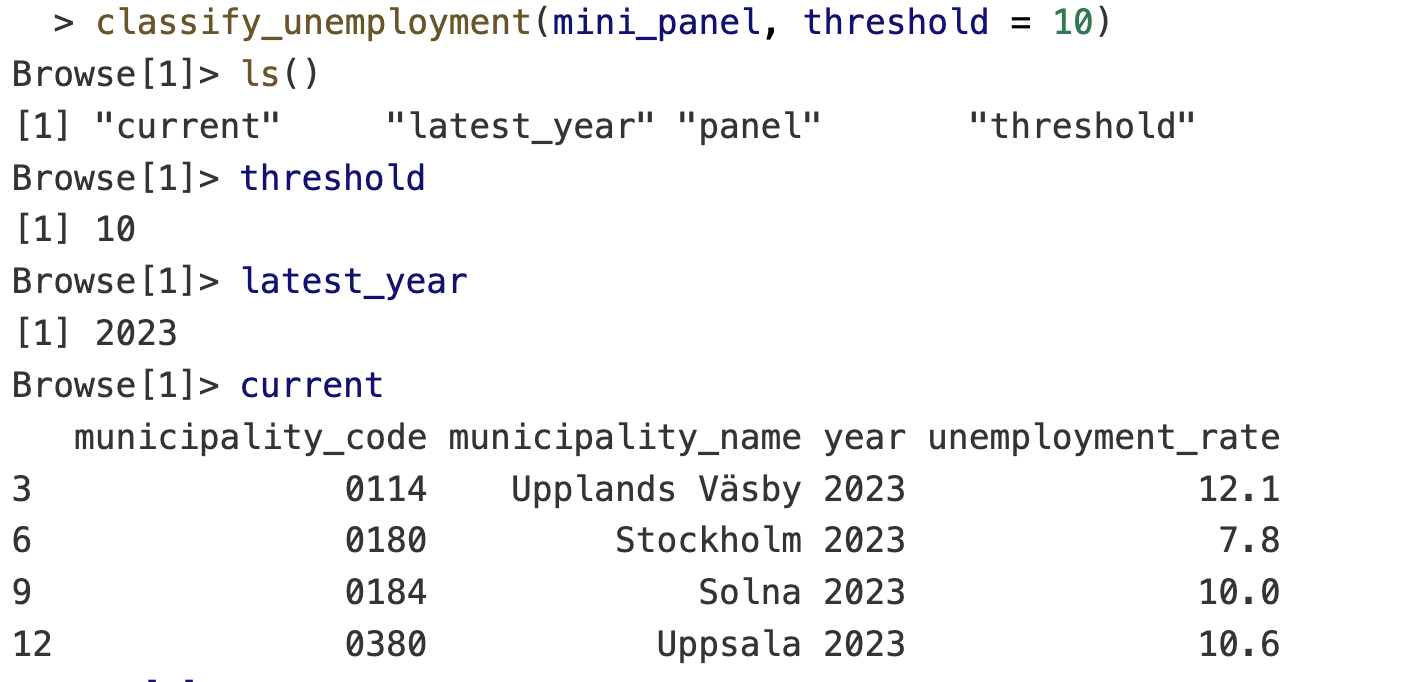
   municipality_code municipality_name year unemployment_rate risk_group
3               0114    Upplands Väsby 2023              12.1        low
6               0180         Stockholm 2023               7.8       high
9               0184             Solna 2023              10.0       high
12              0380           Uppsala 2023              10.6        low
Notice anything wrong?
Use browser() to step through the code interactively
Drop a call to browser() into the function where things look suspicious. When R hits it, execution pauses and the prompt changes to Browse[1]>. From there:
n: next expressions: step into (function)f: finish current functionc: continue until the end or the next breakpointQ: quit
Enter the browser on a function call: debug()
debug(<function_name>)browses the function every time it’s calleddebugonce(<function_name>)entersbrowser()only on the next callundebug(<function_name>)turns debugging off
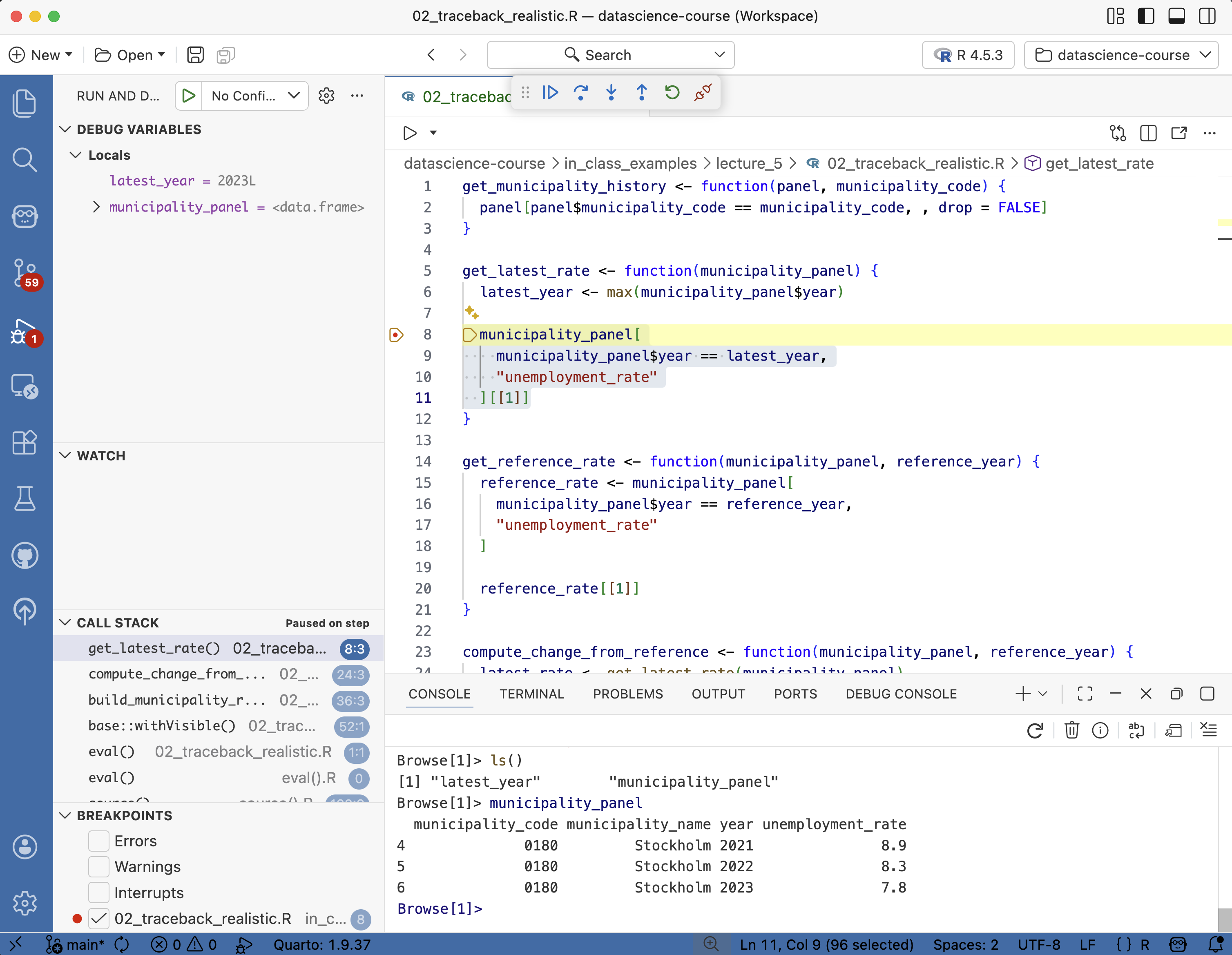
IDE debugger
- VS Code, Positron, and RStudio all have built-in debuggers
- GUI + breakpoints instead of
browser()calls. Same underlying tools.
A useful fallback: recover
- Good when you are unsure where the error is happening
- On error, R shows the call stack and lets you inspect
Pre-empt the bugs: fail usefully
Errors everywhere
Debugging
Pre-empt the bugs: fail usefully
IDE code assistance
Agentic development
Fail early and loudly
Do you know what the code is supposed to do? Why not verify that it actually does?
- Adding checks, errors, messages, assertions, and tests is a cheap way to catch problems early.
stop(), warning(), message()
Use:
stop()to generate errorwarning()to warn about risky statemessage()to inform about progress
Reading data/mini_panel.csvError:
! Can't find data/mini_panel.csvTurn warnings into errors
- Temporarily turns warnings into errors
- Useful when a warning is the first visible sign of a real problem
- Then you can use the usual traceback and debugger tools
Conditional browser()
- Useful when the bad case is rare
- Like in a loop where only certain iterations are problematic
Put checks in the code
Issue stop() or warning() when:
- Required columns are missing
- Key columns have duplicates
- Values are not in a plausible range
- Missing values appear where they should not
- Row counts collapse or explode
- Input file paths are wrong
Municipality panel checks
- Municipality code should not disappear
- Year should stay in the expected range
- Unemployment rate should not be negative
- Keys should not duplicate by accident
- Filters should not silently return zero rows unless that is expected
Debugging versus testing
Debugging
- Manual
- Find out why this failed now
- Trace the first bad assumption
- Inspect current state
- Fix the immediate bug
Testing
- Automatic
- Catch the same bug earlier
- Use known inputs
- Verify expected outputs
After a bug fix, add the smallest check that would have caught it earlier.
IDE code assistance
Errors everywhere
Debugging
Pre-empt the bugs: fail usefully
IDE code assistance
Agentic development
Code formatting with Air
- Air cleans up your code on save.
- Consistent indentation, spacing, line breaks
- Air extension in Positron or VS Code
Code linting with Jarl
- Flags suspicious patterns before you run the code.
- Catches what errors and tests won’t:
any(is.na(x))→ suggests the fasteranyNA(x)- Unreachable code after
return(),stop(), orbreak
- Jarl extension in Positron or VS Code
- Air makes code look consistent, Jarl makes it behave better

AI-assisted code completions
- Start writing code and
Copilotsuggests the rest in grey Tabto accept,Escto dismiss, or keep typing and the suggestion adapts- Suggestions use the whole file as context, not just the current line
- Comments steer what you get:
gives you a suggestion like:
Inline Copilot interactions
- Highlight code and click the
💡(or pressCmd/Ctrl + I) to ask Copilot to modify or review - On R console errors, the Positron assistant can suggest a fix:

From completions to agents
- Completions suggest the next line. You stay in control of every keystroke.
- Agents run multi-step tasks: read files, write files, run commands, loop until done.
- Same underlying models — the difference is how much rope you give them.
Agentic development
Errors everywhere
Debugging
Pre-empt the bugs: fail usefully
IDE code assistance
Agentic development
What is an AI agent?
A language model given tools: read files, write files, run commands, read the output — then loop.
- Copilot agent mode in VS Code / Positron (free with GitHub Education)
- Paid standalones: Claude Code, OpenAI Codex, Cursor
- Recent revolution: models have not changed; their harness has
Working with agents: what changes
- Commit more often. Every agent session starts from a clean diff you can throw away
- Scope each task. One file, one fix — not “refactor the project”
- Read the diff. Every line. Don’t merge what you can’t explain
- Close the loop with checks. Tests,
air,jarl, CI — the agent sees failures and corrects itself
Context is everything
Good context has four parts:
- the file
- the error
- the expected output
- a stop point
Under the hood, agents are just LLMs in a loop — their reasoning is only as good as the context you give them.
AGENTS.md: house rules for the repo
Agents read instruction files before acting. Tell them which packages you prefer, how the code is structured, how to run the tests.
<!-- in_class_examples/lecture_5/agent-example/AGENTS.md -->
# Agent guide

A small playground for practicing Copilot Chat in **agent mode** inside VS Code
or Positron. Each file in `scripts/` has a comment block at the top with the
task and a suggested prompt.

## How this repo steers the agent

Three files tell the agent how to behave here. Open them, read them, edit them
and watch the behaviour change:

- `AGENTS.md` — this file. Read by most agents (Copilot, Claude, Codex, Cursor).
- `.github/copilot-instructions.md` — included automatically in every Copilot chat.
- `.github/instructions/r-scripts.instructions.md` — scoped to `scripts/**/*.R` via `applyTo`.

## Rules for the agent

- Stay in base R unless the script already imports another package.
- Keep diffs small. Do not rewrite whole scripts or rename files.
- Before proposing a fix, name the *first bad assumption* in one or two sentences.
- Use `stop()`, `warning()`, `message()` for guards — not `assertthat` or `assertr`.
- Use `testthat` for tests. One `test_that(...)` block per behaviour.
- Never invent packages or functions. If unsure, say so.
- If the task is vague, ask for the smallest useful next step instead of guessing.

## How students should use this

1. Open this folder as its own workspace in VS Code or Positron.
2. Open Copilot Chat and switch to **Agent** mode.
3. Work through `scripts/01_…` to `scripts/04_…` in order.
4. For each: read the comment block, try the suggested prompt, read the diff
before accepting, then run the code.Point the agent at the right files
AGENTS.md doesn’t have to say everything — it can point.
- Keeps the root file short and scannable
- Agent loads detail only when the task needs it
- Think of it as a table of contents for the repo
Agents read text like humans do
- No special format required — READMEs, source, CSV headers,
.Rprofile - A good comment or docstring helps both your teammate and the agent
- The flip side: outdated or misleading docs mislead the agent too
- Write for humans first; agents come along for free
Skills: packaging repeatable tasks
A skill is a reusable bundle of instructions (± helper scripts) for a specific workflow the agent should run the same way every time.
- “Open a PR the way we like it”
- “Check register metadata before writing a query”
- “Format, lint, run tests, then commit”
The agent picks up the skill when the task matches — you stop re-explaining the same workflow in every prompt.
GitHub Issues and PRs: a systematic review surface
- Issue = contract: what “done” looks like, and a good home for agent instructions
- Pull request = diff: line-by-line review, the place to reject bad edits
Never paste secrets into AI tools
- API keys, passwords, credentials
- Private or unpublished data
- Anything you wouldn’t send on Slack or push to GitHub
Assume anything you paste may be logged or used for training.
Before you accept the diff
- Commit your own work first — cheap rollback
- Open the diff and read every line
- Run the code
- Confirm package and function names actually exist (hallucination check)
- Reject large edits that solve the wrong problem
- If you can’t explain it, don’t submit it
Live AI demo
- Ask Copilot to explain the traceback in
01_traceback_test.R - Ask for the smallest fix, not a rewrite
- Ask for one guard that prevents the same mistake next time
- Review the diff before accepting anything
Next lecture: Data Wrangling I
Extra: data validation with assertr
Fail-fast style. Halts the pipeline on the first bad row.
verify(): one logical expression — row counts, column namesassert()/insist(): predicate / data-driven bounds per column- Error points at the offending rows
Extra: data validation with validate
Report style. Define rules, confront the data, inspect — nothing crashes.
- Rules are objects: store, reuse, keep in a YAML file
- Pass/fail report per rule instead of stopping
Extra: unit tests and testthat
Validation checks data. Tests check code. Remember the silent bug in classify_unemployment()?
── Failure: high unemployment is classified as high risk ─────────────────────────────────
Expected `result$risk_group` to equal "high".
Differences:
1/1 mismatches
x[1]: "low"
y[1]: "high"
Error:
! Test failed with 1 failure and 0 successes.Extra: unit tests and testthat (cont.)
- After each bug fix, add the smallest test that would have caught it
- Run with
testthat::test_file()— works in plain projects, not just packages - Tests are documentation: they show how the function is supposed to be used and what it should return
- Really useful when you have an agent making edits: ask the agent to write a test that would have caught the bug before accepting the fix
Extra: continuous integration (CI)
Automatic checks on every change. Like a spell-checker for your code, but it can run tests and linters too.
- GitHub Actions is the standard for R — free for public repos
- You actually already experienced the auto-grading CI in PS1
- Configure it to run on every push or pull request
usethis::use_github_action("check-standard")for packages