Lecture 3: R Basics I

EC7422: Data Science for Economic Analysis

Adam Altmejd Selder

The Institute for Evaluation of Labour Market and Education Policy (IFAU)

April 7, 2026

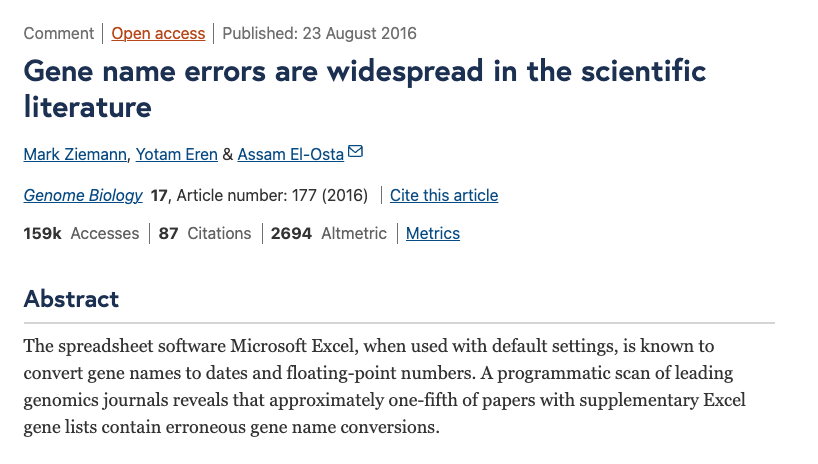
Why code instead of spreadsheet surgery?


Programming fundamentals

Most languages revolve around a small set of ideas:

  • Expressions return values
  • Operators combine values
  • Assignment binds names
  • Types shape behavior
  • Logic builds conditions
  • Control flow directs execution
  • Functions package reusable code

Setup check

  • VSCode R interpreter running
  • R Script file open
  • Ctrl/cmd+enter sends line to interpreter

Moving from Stata to R

Some habits carry over; some do not:

  • Not limited to one dataset in memory
  • Stata commands = R functions
  • Less “hand-holding”, need to be more mindful about what you run
  • More dependent on external packages

R fundamentals

“Everything that exists is an object. Everything that happens is a function call.”

All objects can be named, inspected, and reused.

Expressions, Operators, And Assignment

  • Expressions, Operators, And Assignment

  • Objects And Types

  • Logic And Missingness

  • Control Flow

  • Functions

  • Packages, Comments, Errors, and Help

Arithmetic with operators

Type these in the R interpreter:

12 + 3
[1] 15
8 - 33
[1] -25
20 / 3
[1] 6.666667
10^(2 + 1) - 1
[1] 999

+, -, /, and ^ are arithmetic operators.

Evaluation in the interpreter

  • The code is an expression
  • The interpreter evaluates it
  • The printed result is a value
  • Nothing saved yet

Assignment

<- stores an object in memory and binds a name to it

coffee_cups <- 3
price_per_cup <- 25

We can then run operations on those names:

coffee_cups * price_per_cup
[1] 75

Naming rules

Names should be valid and readable:

1a <- 1
Error in parse(text = input): <text>:1:2: unexpected symbol
1: 1a
     ^
  • Start with a letter
  • Case sensitive (income and Income are different)
  • Descriptive beats short (no character limit!)

Names can be rebound / overwritten

result <- 3
result
[1] 3
result <- "pass"
result
[1] "pass"

Session memory is temporary

  • Objects live in session memory
  • Restart R -> gone
  • Scripts recreate state

Objects And Types

  • Expressions, Operators, And Assignment

  • Objects And Types

  • Logic And Missingness

  • Control Flow

  • Functions

  • Packages, Comments, Errors, and Help

Objects, names, functions

Much R code can be read as a sequence of steps:

  • Create or retrieve an object
  • Bind it to a name
  • Pass it to a function
  • Get back another object
  • Inspect when unsure

Example

score <- 62
sqrt(score)
[1] 7.874008
  • score is a name
  • 62 creates a numeric object (a double)
  • <- binds that object to the name score
  • sqrt is a function object
  • sqrt(score) calls that function

How is an object stored in memory?

  • typeof() tells us
typeof(1.0)
[1] "double"
typeof(1L)
[1] "integer"
typeof(TRUE)
[1] "logical"
typeof("text")
[1] "character"

Remember: everything is an object!

typeof(typeof)
[1] "closure"

Basic atomic types

Most beginner examples use a few basic storage types:

  • double numbers with decimals
  • integer whole numbers
  • logical true / false
  • character text

typeof() is storage, class() is behavior

Storage type and class often overlap, but not always:

today <- as.Date("2026-04-07")
typeof(today)
[1] "double"
class(today)
[1] "Date"

Class can change a function’s method

The same function name can behave differently for different object classes:

mean(c(1, 2, 3, 4))
[1] 2.5
mean(as.Date(c("2024-01-01", "2025-01-01")))
[1] "2024-07-02"
  • Same function name
  • Different object classes
  • Different methods behind the scenes

Live coding: inspect simple objects

  • Number
  • Text
  • Date
  • Check typeof() / class()

Logic And Missingness

  • Expressions, Operators, And Assignment

  • Objects And Types

  • Logic And Missingness

  • Control Flow

  • Functions

  • Packages, Comments, Errors, and Help

Logic uses operators

We often need conditions, not just calculations:

1 == 2
[1] FALSE
1 < 2
[1] TRUE
1 == 2 & 1 < 2
[1] FALSE
1 == 2 | 1 < 2
[1] TRUE
  • ==, <, > compare
  • &, | combine conditions

A practical condition

exam_score <- 58
exam_score >= 50
[1] TRUE
exam_score >= 50 & exam_score < 70
[1] TRUE
exam_score < 50 | exam_score > 90
[1] FALSE

Precedence

Let’s say we want to check if a variable is larger than two other variables:

x <- 3; y <- 1; z <- 4
x > y & z
[1] TRUE

Logical operators (>, ==, etc) are evaluated before Boolean (& and |).

3 > 1
[1] TRUE
TRUE & 4
[1] TRUE

To get it right we need to be explicit:

x > y & x > z
[1] FALSE

Decimal comparisons need care

Decimal numbers are stored as floating points (double), which can lead to surprising results:

0.3 == 0.3
[1] TRUE
0.1 + 0.2 == 0.3
[1] FALSE

Use a tolerance-based check instead:

isTRUE(all.equal(0.1 + 0.2, 0.3))
[1] TRUE
abs((0.1 + 0.2) - 0.3) < 1e-8
[1] TRUE

! negates a logical result

! flips TRUE to FALSE and FALSE to TRUE:

!TRUE
[1] FALSE
!(1 < 3)
[1] FALSE
  • Useful for “not”
  • Common in filters

Not available = NA

NA is a missing value indicator

  • NA is not zero
  • NA is not false
  • NA is not equal to itself!
NA > 0
[1] NA
NA == FALSE
[1] NA
NA == NA
[1] NA

is.na() checks missingness

is.na() returns TRUE for missing values:

  • TRUE means missing
  • FALSE means observed
is.na(NA)
[1] TRUE
is.na(3)
[1] FALSE

Special values in numeric work

Some numeric operations do not return ordinary finite numbers or NA:

  • Inf / -Inf from dividing by zero
  • NaN from undefined numeric operations
1 / 0
[1] Inf
0 / 0
[1] NaN

is.na() catches both NA and NaN, use is.nan() to catch only NaN:

is.na(NaN)
[1] TRUE
is.nan(NA)
[1] FALSE
is.nan(NaN)
[1] TRUE

Control Flow

  • Expressions, Operators, And Assignment

  • Objects And Types

  • Logic And Missingness

  • Control Flow

  • Functions

  • Packages, Comments, Errors, and Help

Control flow decides what runs

  • Logic creates conditions
  • Control flow uses them
  • Branch or repeat as needed

if / else

Use if / else when one logical value should choose one branch:

if (condition) "do this" else "do that"

condition is a single logical value that determines which expression is evaluated and returned.

if (1 == 3) "foo" else "bar"
[1] "bar"

Prefer the multi-line form

if (TRUE) {
    "yes"
} else {
    "no"
}
[1] "yes"

for loops repeat a block

for (i in 1:4) {
    print(i^2)
}
[1] 1
[1] 4
[1] 9
[1] 16
  • Repeats one recipe
  • i takes one value at a time
  • Basic control-flow tool

Functions

  • Expressions, Operators, And Assignment

  • Objects And Types

  • Logic And Missingness

  • Control Flow

  • Functions

  • Packages, Comments, Errors, and Help

Why functions matter

Functions make code more reusable:

  • Same recipe, new inputs
  • Less repetition
  • Easier testing
  • Easier debugging

Functions: inputs and output

A function call passes inputs to a function and returns a value:

sqrt(16)
[1] 4
round(pi, digits = 3)
[1] 3.142
abs(-12)
[1] 12
  • Inputs go in
  • A value comes back

A function call has structure

round(pi, digits = 3)
[1] 3.142
  • round is the function
  • pi is the first argument
  • digits = 3 names another argument
  • The call returns 3.142

Functions are objects too

typeof(mean)
[1] "closure"
class(mean)
[1] "function"

A function definition has three parts

add_bonus <- function(score, bonus = 5) {
    score + bonus
}
  • Name on the left
  • Arguments inside function(...)
  • Returned expression inside { ... }

Named and default arguments

Inside function calls, = names an argument. Functions can also provide defaults:

add_bonus <- function(score, bonus = 5) {
    score + bonus
}

add_bonus(55)
[1] 60
add_bonus(55, bonus = 10)
[1] 65

Functions use local names

x <- 10
show_local <- function() {
    x <- 20
    x
}
c(show_local(), x)
[1] 20 10
  • Function call creates local names
  • Local assignment stays local
  • Outer name unchanged

Name lookup can go outward

x <- 10
add_outer_x <- function(z) {
    z + x
}
add_outer_x(5)
[1] 15
  • Local names first
  • Then surrounding names
  • Convenient, but easy to hide dependencies - avoid

Pipes (|>) make nesting less awkward

mean(c(seq(0, 10), rep(NA, 10)), na.rm = TRUE)
[1] 5

is the same as

seq(0, 10) |> 
  c(rep(NA, 10)) |> 
  mean(na.rm = TRUE)
[1] 5
  • Piped content enters the first argument of the next function
  • Avoids nested parentheses
  • Reads left to right
  • Still a function call, just different syntax

Write your own function

return_smaller <- function(v1, v2) {
    min(v1, v2)
}

return_smaller(3, 8)
[1] 3

Live coding: tiny function

  • Add 10
  • Give it a default
  • Test two different inputs

Packages, Comments, Errors, and Help

  • Expressions, Operators, And Assignment

  • Objects And Types

  • Logic And Missingness

  • Control Flow

  • Functions

  • Packages, Comments, Errors, and Help

Packages extend R

Packages add functions, datasets, and tools:

install.packages("ggplot2")
library(ggplot2)
  • Install once
  • Load when needed
  • Read package documentation

package::function() syntax

This pattern makes the source of a function explicit:

readr::read_csv("data.csv")
stats::filter(x, rep(1 / 3, 3))
  • Avoid name conflicts
  • Clarify provenance

Comments start with #

Comments are text for humans. The interpreter ignores them:

# Drop missing values before computing the mean
average_non_missing <- mean(x, na.rm = TRUE)
  • Add intent
  • Add context
  • Add warnings when needed

Prefer comments that add context

# Less helpful:
# Calculate the mean
m <- mean(x, na.rm = TRUE)

# Better:
average_non_missing <- mean(x, na.rm = TRUE)
  • Clear names first
  • Comments for context
  • Avoid narrating obvious code

A short debugging checklist

  • Read the error
  • Check names
  • Print object
  • Check type / class
  • Get help

Read the error

my_data <- data.frame(a = c(1, 2), b = c(3, 4))
my_dat[1]
Error:
! object 'my_dat' not found
  • my_data exists
  • my_dat does not

Understanding error messages

dat = data.frame(a = c(1,2),
                 b = c(3,4))
data[1]
Error in `data[1]`:
! object of type 'closure' is not subsettable

!?!?

typeof(data)
[1] "closure"
typeof(dat)
[1] "list"

Learning to read error messages will help you find coding errors.

Check names

exists("my_data")
[1] TRUE
exists("my_dat")
[1] FALSE
  • Exact spelling matters
  • One letter can break the code

Check type / class

typeof(my_data)
[1] "list"
class(my_data)
[1] "data.frame"
  • Storage and behavior both matter
  • Different objects support different operations

Get help

  • ?mean
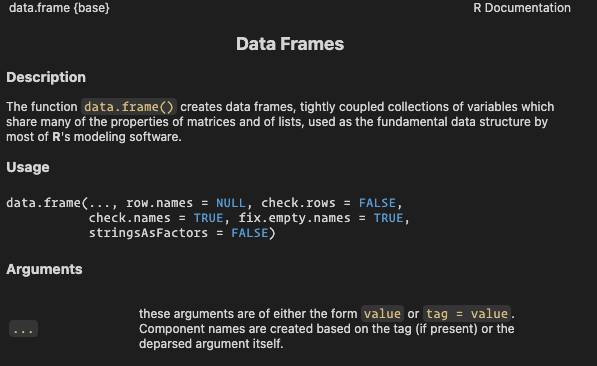
  • ?data.frame
  • args(mean)


Package docs and vignettes

Package documentation is often the best starting point:

help(package = "ggplot2")
vignette(package = "ggplot2")
  • Help page for the package
  • List available vignettes

Main takeaways

  • Expressions return values
  • Assignment creates reusable names
  • Types shape behavior
  • Logic is explicit
  • Control flow shapes execution
  • Functions package reusable work
  • Packages extend the language
  • Help and errors are part of the workflow

Next lecture: Vectors, Tables, and Tidy Thinking