| municipality_code | municipality_name | year | unemployment_rate |
|---|---|---|---|
| 0114 | Upplands Väsby | 2016 | 11.9 |
| 0115 | Vallentuna | 2016 | 6.1 |
| 0117 | Österåker | 2016 | 7.2 |
| 0120 | Värmdö | 2016 | 7.3 |
| 0123 | Järfälla | 2016 | 13.7 |
| 0125 | Ekerö | 2016 | 5.6 |
| 0126 | Huddinge | 2016 | 12.0 |
| 0127 | Botkyrka | 2016 | 17.7 |
Introduction
Adam Altmejd 
The Institute for Evaluation of Labour Market and Education Policy (IFAU)
2026-03-24
Introduction
Welcome to Data Science for Economic Analysis.
Who am I?
- Adam Altmejd Selder — adam.altmejd@su.se
- I study inequality, education, and health at IFAU
- But in practice I spend a large share of my time matching, merging, cleaning, checking, and visualizing data
Who are you?
Let’s use Menti to collect a little course data.
Introduction
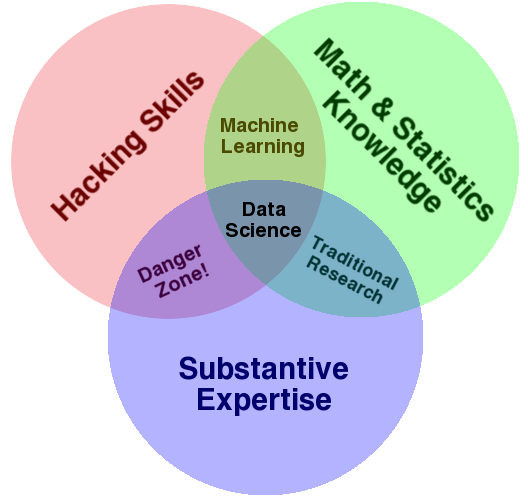
- This course adds practical data-work skills to your economist toolkit
- The focus is workflow, not just syntax
- I will focus on data collection, cleaning, checking, transformation, and communication
- The point is to make you more independent, more productive, and slightly less dependent on spreadsheet surgery
The empirical research process
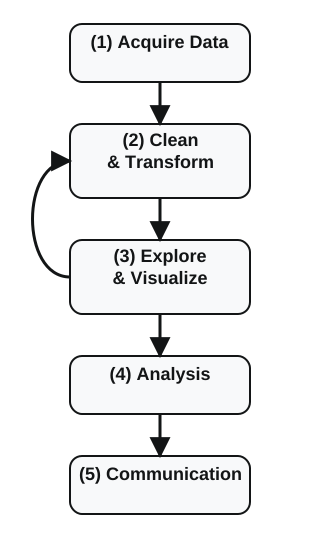
- Most economics training focuses on step 4, and sometimes step 5.
- This course focuses on getting steps 1 to 3 right enough that step 4 is not built on garbage.
- The loop matters: exploration often sends you back to cleaning, checking, and rethinking the data.
Why should you learn data science?
- Economists now work with more data, from more sources, than even a few years ago
- Sweden is unusually data-rich: registers, administrative data, municipality data, and public APIs
- That is a real comparative advantage, but only if you can actually get the data, clean it, join it, and check it
- Good econometrics on bad or badly handled data is still bad research
Why this course?
- A strong economics degree already gives you substantive knowledge and econometrics
- What it often does not give you is a practical workflow for turning raw data into something usable
- These skills complement econometrics rather than replacing it
- They matter in research, policy work, and private-sector data jobs
- I use these tools all the time; I have not estimated a DSGE model since 2013
Why code at all?
- Menus and spreadsheets can get you surprisingly far
- But code is reusable, reproducible, reviewable, and easier to debug
- If you need to do the same thing twice, you probably want code
- A script is also a record of what you actually did
- Sometimes Excel or Stata is still the right tool; the point is to pick the simplest tool that does the job well
Why R for this course?
- I will assess work in
R Ris strong for data acquisition, wrangling, and visualization- It is much better suited than
Statafor the kind of programming workflow this course teaches - The skills transfer well to other languages, especially
Python
And what about Stata?
Statais still useful for a lot of econometric analysis- This is not a religious war
- But
Statais not the right core language for learning modern data-work habits, packages, and APIs - I want you to learn the right tool for the job, not swear loyalty to one tool forever
Reproducibility and Work Habits
Reproducibility and Work Habits
Our Working Environment = VS Code
Let’s Do Some Data Science
Concluding Remarks
Common data problems
- Invalid or inconsistent values
- Missing values coded in strange ways
- Messy or ambiguous names
- Duplicates
- Mixed date formats
- Missing or non-unique keys
- Encoding problems 😮💨
Programming habits that pay off
- Write code you can rerun from scratch
- Do not repeat yourself when one function or one script will do
- Name things so another human can read them
- Keep a sensible project structure and a short
README - Check your data early and often
Readable beats clever
- Future-you is also a collaborator, and future-you is usually annoyed
- Prefer
unemployment_ratetou_rate2 - Same for values:
sex = woman/manis clearer thanKon = 1/2, even if that is howSCBcodes it - Prefer one clear transformation at a time
- A little verbosity is cheaper than silent confusion
Check, do not just trust
- Print summaries
- Check keys and duplicates
- Look for missingness and weird categories
- Make quick plots before you estimate anything
- Most bad results look “reasonable” until you inspect the data properly
Frustration is normal
- Coding is hard even for experienced people
- Getting stuck is not a sign that you are bad at this
- The right response is usually to slow down, inspect the objects, and change one thing at a time
- I will spend a lot of time on debugging and workflow discipline in this course
Our Working Environment = VS Code
Reproducibility and Work Habits
Our Working Environment = VS Code
Let’s Do Some Data Science
Concluding Remarks
VS Code for this course
- A text editor with useful extras:
- file navigation
- terminal integration
- Git integration
- extensions for
R - AI support tools
- I use it because it is flexible and works well with the workflow I want to teach
AI assistants in VS Code
- GitHub Copilot is available for free for many students through GitHub Education
- Useful for:
- explaining errors
- suggesting code
- helping you search documentation faster
- Treat it like a fast assistant, not an autopilot
- Only submit code you understand and can explain
VS Code and R
- To work comfortably in
R, you will need thevscode-Rextension PS0will walk you through the required setup- The point of
PS0is not “read some instructions” - The point is to prove that your environment actually works
Let’s Do Some Data Science
Reproducibility and Work Habits
Our Working Environment = VS Code
Let’s Do Some Data Science
Concluding Remarks
A tiny live demo
- In class I will run a short script that talks to the
SCBAPI - The script only pulls what it needs: municipality code, year, and unemployment rate
- Then it downloads a municipality-name key from a second API, merges it in, and makes two quick plots
- The script saves the resulting dataset in this lecture folder, and these slides load that saved file
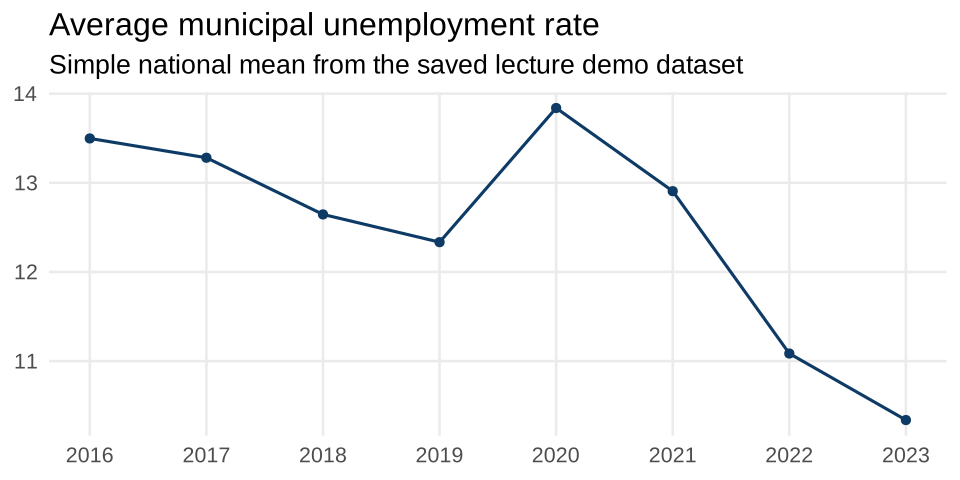
What the demo produces
And one quick plot
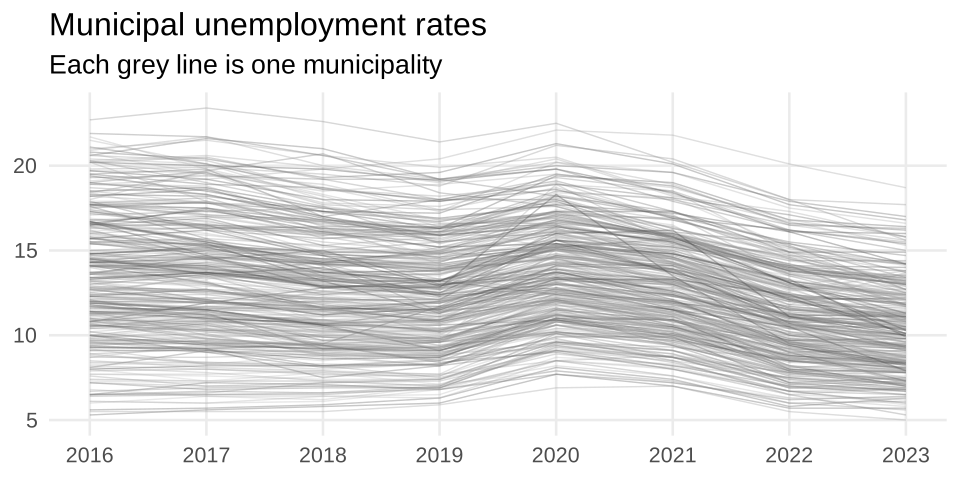
Same data, one line per municipality
What this tiny demo already teaches
- The interesting part is not the plot itself. It is the path from source to plot.
- Names often come from a separate lookup table rather than the main measurement data
- The key is
municipality_codeplusyear municipality_nameis useful for humans, butmunicipality_codeis still the actual identifiermunicipality_codeshould be read as text, or leading zeroes can disappear- Even a simple series may need multiple source tables because official data definitions change
- Later lectures will show how to inspect, clean, validate, and extend this into the full course backbone
Concluding Remarks
Reproducibility and Work Habits
Our Working Environment = VS Code
Let’s Do Some Data Science
Concluding Remarks
Course Preview
- Introduction to Data Science for Economists
- Project Workflows and Version Control
RBasics IRBasics II: Tabular Data and Tidy Thinking- Independent Workflows, Debugging, and AI Support
- Data Wrangling I
- Data Wrangling II
- APIs and External Data
LLMsfor Data Processing- Visualization and Communication
Problem sets
PS0: readiness checkpoint, due before lecture 2PS1: released after lecture 2PS2: released after lecture 5PS3: released after lecture 8- The regular problem sets are pass/fail
Problem Set 0: Getting Set Up
- Install
R, Git, and VS Code - Create or fix your GitHub setup
- Get the required extensions and packages in place
- Open the course project correctly
- Run one script successfully
- Make one Git commit
- Submit proof that your environment actually works
Concluding remarks
- Learning data science gives you a very useful practical toolkit
- The course will be most useful if you bring your computer and actually try things yourself
- Please tell me when I am going too fast or when something is too implicit
- Next time I will make the assignment workflow concrete